[Update] I tried the latest version of VLC player (0.8.6d) and it played OK without modification. 12/27/2007
VLC is my favorite media player. It plays almost every media format and you can get it for every major platforms.
I tried VLC to play some AVI files on Vista RC2. It didn’t play them properly. I can hear sound but no video showing. I remember running into similar problems on XP. I had to reduce the color from 24 bit to 16 bit. I tried to do the same on Vista RC2, but it’s a no go. Still no video.
I then found this solution. It tells you to set the video rendering engine to OpenGL. I tried to use other settings and found that “DirectX video output” and “Windows GDI video output” also work. Here are the steps.
- Open VLC media player.
- Click on Settings and select Preferences… .
- Expand Video and click on Output modules. Note that DON’T expand Output modules, just click on it.
- Check Advanced options in the lower right corner.
- Set Video output module to either “DirectX“, “OpenGL” or “Windows GDI”

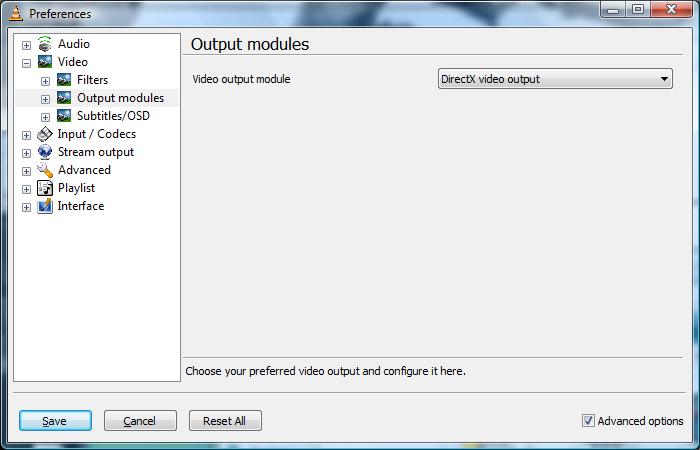
You’ll need to restart VLC media player after the change.

Find deals on Amazon.com
Vista

This post may contain affiliated links. When you click on the link and purchase a product, we receive a small commision to keep us running. Thanks.

Thank you so much, I have been using other players like wmp, and it does not work for everything like vlc, and now I can actualy view what I am listening to in a video.. lol
Thanks 🙂
Thanks a million, I was expanding on the output modules!!! I read #98 and that cleared eveything up. Working perfect. Thanks so much to AMIDA168 for pointing out what i was doing wrong!!!! Thanks soooooooo much!!!
very helpful. thanks a million
Thanks so much for the added information. I was having the same problems as Rayelene. I was expanding the “Outputs” module and I could not get the player to work. It works great now. Anyone that is having problems, see #98, it will clear up your issues. Vista lives another day. LOL
I’d also like to post my gratitude.
Cheers =)
Thanx, been looking for a solution for a couple of days. Now making use of Windows CGDI.
Me too. Got same probs and now is fine. I only use VLC to watch any kinda video
Arale Chan
Thanks man, solved my VLC problems just fine. It also made me able to fix Media Player Classic disabling Vistas Aero with almost the same approach
Thanks dude! The life in front of my computer can start again…
God Bless you!
Hi, can anyone tell me how to use VLC to set a video as wallpaper, just like Vista’s Dreamscenes?
hey thanks a ton. I was just about to uninstall VLC media player when i hit upon your posting through google search. You r a genius
nice one peeps, direct x works best for me. When on windows gdi the pic seems to be fuzzy. Yes vista goes to basic but reverts to aero when vlc is stopped ;).
Thanks a ton buddy
Cheers
The Dude,
Check out this post about how to enable Wallpaper mode in VLC player.
It worked!
Thanks a lot.
hi i really worried a lot before i see ur message. thx a lot ,,,
If any Microsofties are reading this, give this man a job!!!
Thanks dude
Excellent….thanks.
thank a lot man
i was so worried abt this
MAn….you’re a star. You’ve saved me hours of grief. First thread I looked at and there’s the answer.
Well done.
Thanks so much, who knew? Not me that’s for sure!
Hi Thank you so much!. I was struggling a lot to view movies in the VLC player in Vista. Now as per your steps, I did it and able to watch movies.
Hay Thanks 4 that i was about to through my new laptop out the window lol, Windows GDI worked fine for me 🙂
Cheers m8
Jo 🙂
Hey…Thank you so much!!!
YOU ARE THE MAN!
Cheers
“OpenGL – Not sure why, but on my comp it’s very laggy, enough to make everything unwatchable. Sounds like it works on other computers though.”
It probably depends on your graphics card developer’s drivers. Vista doesn’t include any good OpenGL drivers. So if you’re on for example nVidia, ensure you’re on the latest ForceWare drivers!
Thanks so much man… you rock.
Was getting so annoyed with not being able to play any video files on my new laptop until i read this.
Hi,
I bought a HP notebook dv9000. It comes with window vista home Premium,
I try to open Media player, and download Media player 11, but never work,
I do not know how to make it works.
Can you help?
thanks
Thank you! I never would’ve figured this out on my own. 🙂
You just saved the VLC reputation. Thank you so much! I thought this was it for VLC. But I guess it continues being number ONE after this solution. You the man!
I too was unable to see the video so made change in video output to open GL. Now while i can see video but audio is real bad, it gives lot of echo. Any suggestion what setup i may be missing.thanks in advance
Anyone else got problems with the sound? Thanx for fixing the picture! much appreciated.
Thanks mate…. Very useful and easy solution…..
sweet !
that works perfectly ! thank you
thnx alottttt
I had to add my name to this thanks list. 🙂
thanks!
thanks man
thankyou so much, your a legend and a hero!
thanks man!
OMG thank you sooo much!! I had deleted 3 movies thinking they were bad dls. Again, thank you.
I’m going nuts here, my windows vista is killing me, each time i play a video file with my VLC player, all i can hear is sound no videos whatsoever. I did exactly what “amida 168” suggested but for some reason my VLC playr doesn’t have the output module option and the Advanced options tab in the lower right corner doesn’t have an option for either “DirectX“, “OpenGL†or “Windows GDI“
So i’m beginning to think I might be using the wrong version VLC media player, this is what i downloaded VLC player 0.8.6b and it used o work on XP.
So if u guys, use any other version can u pls let me know where get it from.
I NEED HELP.
Waleface,
Please refer to comment #98.
haaaaaa what a relief. thanks man…It felt so good I even took the time to register to this blog 🙂
Hahahaha, I registered too, just because I am so grateful.
THANK YOU SO MUCH. 🙂 I don’t have to worry about my counter anymore, I’ve already changed the code twice. Eek. 🙂 Now I can watch Robin Hood Men in Tights with no worries. Hahahahah!