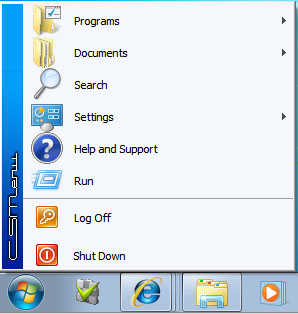
One feature I like about Windows 7 is the start menu. I can simply find what I want by typing the name of the item I am looking for. However, not everyone likes the start menu. I have been asked several times about getting the classic menu (Windows 2000 style) back.
If you’re thinking about purchasing a new GPU, we’d greatly appreciate it if you used our Amazon Associate links. The price you pay will be exactly the same, but Amazon provides us with a small commission for each purchase. It’s a simple way to support our site and helps us keep creating useful content for you. Recommended GPUs: RTX 5090, RTX 5080, and RTX 5070. #ad
Unlike Vista, Windows 7 completely removes the classic menu option. If you want to use it, you have to install a 3rd party program called CSMenu. Once installed, pin it to the taskbar next to the Start button. Whenever you need to use the classic menu, just click on the CSMenu’s icon. When CSMenu is running in the background, clicking on the start button or pressing the Windows key would bring up the classic menu. You can use CSMenu with Start Killer which hides the start button.
CSMenu is at version 1.0 now. You can download it from this site. The basic version is freeware. The site also offers a shareware version of CSMenu. The shareware version lets you use it with Aero theme and offers you more options to customize the menu.
Leave a Reply