 A user has complained about a problem with Thunderbird for a long time. The problem is that sometimes when the user sends a message, the message got sent but then a pop up window shows up saying “Error Copying to Sent Folder”. I thought it’s related to the mail server and did not pay close attention to it.
If you’re thinking about purchasing a new GPU, we’d greatly appreciate it if you used our Amazon Associate links. The price you pay will be exactly the same, but Amazon provides us with a small commission for each purchase. It’s a simple way to support our site and helps us keep creating useful content for you. Recommended GPUs: RTX 5090, RTX 5080, and RTX 5070. #ad
I did a google search on this problem yesterday and found this page. It looked promising, so I tried it on my user’s machine. The user has yet to encounter this problem after the changes. Here are the steps for Thunderbird 2.0.0.23.
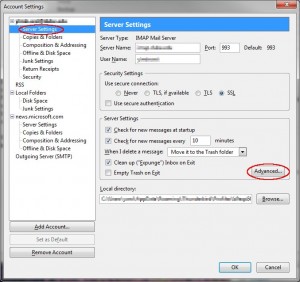
- Click on Tools -> Account Settings.
- Click on Server Settings under your account and then click on Advanced.
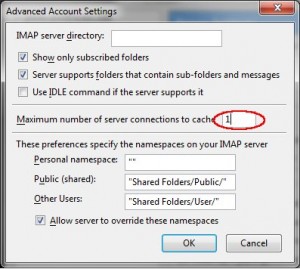
- Change Maximum number of server connections to cache to 1. The default is 5, just in case you want to change it back.
- Close all the dialogs and restart Thunderbird.

Lo probé en la PC de Yanina, que es una potra, y no funcionó.
Roque, Te vamos a hacer el ORTO!!!!!! PELOTUDO!!!!
Yo lo probé en la casa de tu hermana y no funcionó, fijate en lo de la hija de puta de tu mujer.
atte.