You use Directory Utility to join a Mac to an Open Directory in Leopard. It’s convenient because you only need to use one application. When I tried to add a new iMac running Snow Leopard to our Open Directory, I found that there is no Directory Utility in /Applications/Utilities . The utility is hidden in /System/Library/CoreServices , and you cannot use it to join the computer to the Open Directory. Therefore, it’s not very useful.
If you’re thinking about purchasing a new GPU, we’d greatly appreciate it if you used our Amazon Associate links. The price you pay will be exactly the same, but Amazon provides us with a small commission for each purchase. It’s a simple way to support our site and helps us keep creating useful content for you. Recommended GPUs: RTX 5090, RTX 5080, and RTX 5070. #ad
The function of joining the computer to OD has been integrated into the System Preferences. To do it, follow these steps:
- Click on the Apple icon on the menu and select System Preferences.
- Click on Accounts -> Login Options.
- Click on the Join button to join the computer to a Network Account Server.

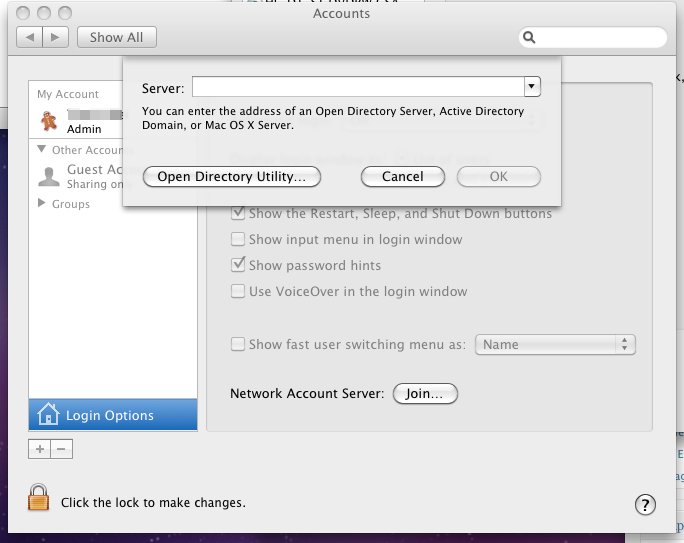
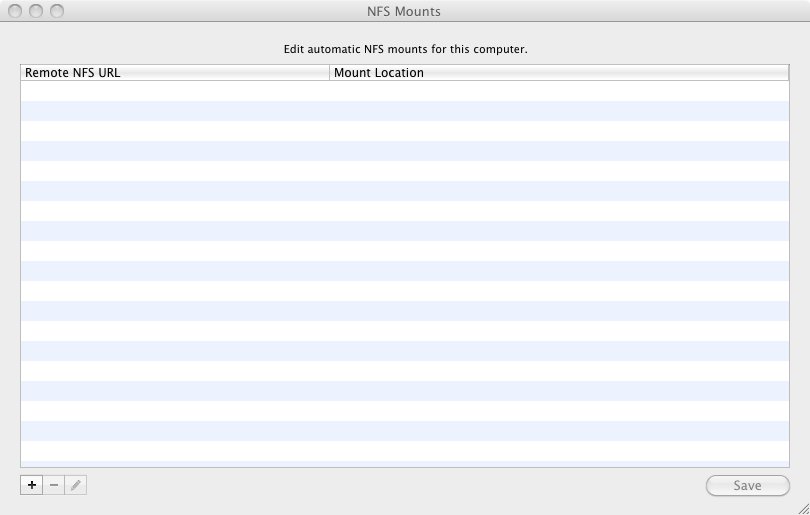
You can open the Directory Utility from the poped up dialog. However, the ability to mount NFS shares is also stripped out from the Directory Utility. To mount NFS shares, use Disk Utility instead.
- Invoke Disk Utility.
- Click on File -> NFS Mounts.

- Add the shares.
Leave a Reply