The recent items (recent documents in XP) is not enabled in Windows 7 by default. Here are the steps to enable it.
If you’re thinking about purchasing a new GPU, we’d greatly appreciate it if you used our Amazon Associate links. The price you pay will be exactly the same, but Amazon provides us with a small commission for each purchase. It’s a simple way to support our site and helps us keep creating useful content for you. Recommended GPUs: RTX 5090, RTX 5080, and RTX 5070. #ad
- Right click on the Windows button and select Properties.
- Click on the Start Menu tab and make sure the Store and display recently opened items in the Start menu and the taskbar box is checked.

- Click on the Customize… button to bring up the Customize Start Menu dialog.
- Scroll down and make sure the Recent Items box is checked.
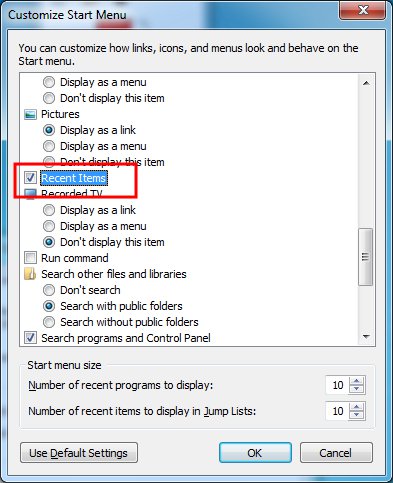
- Click on OK buttons to close both dialogs. The Recent Items is now enabled.

Leave a Reply