Apple’s Boot Camp Assist 1.1.2 b includes SigmaTel audio driver for MacBook. However, when I first installed it, the microphone was not working.
If you’re thinking about purchasing a new GPU, we’d greatly appreciate it if you used our Amazon Associate links. The price you pay will be exactly the same, but Amazon provides us with a small commission for each purchase. It’s a simple way to support our site and helps us keep creating useful content for you. Recommended GPUs: RTX 5090, RTX 5080, and RTX 5070. #ad
I first thought the microphone driver is not compatible with Vista. Later, I found that it’s not a compatibility problem. The microphone is just not enabled by default. Here is how you enable it.
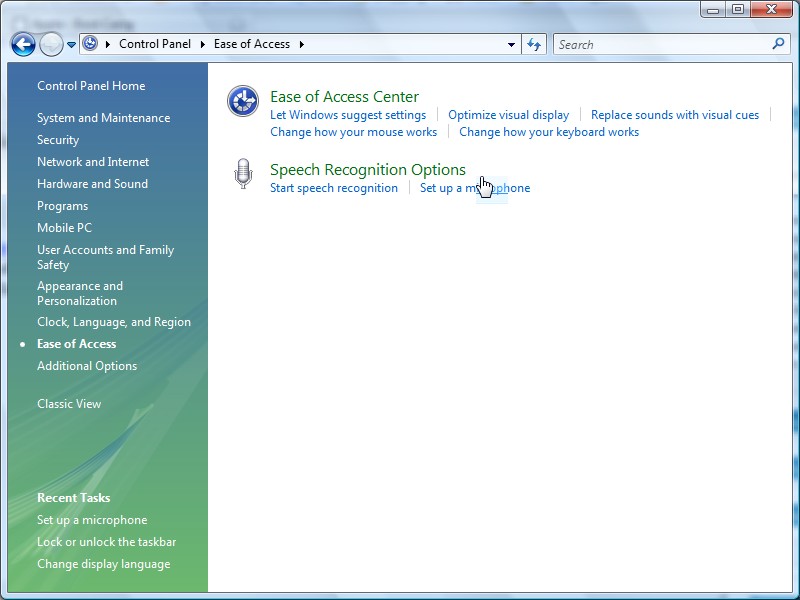
- Open up Control Panel. Go to Ease of Access.

- Click on Set up a microphone.

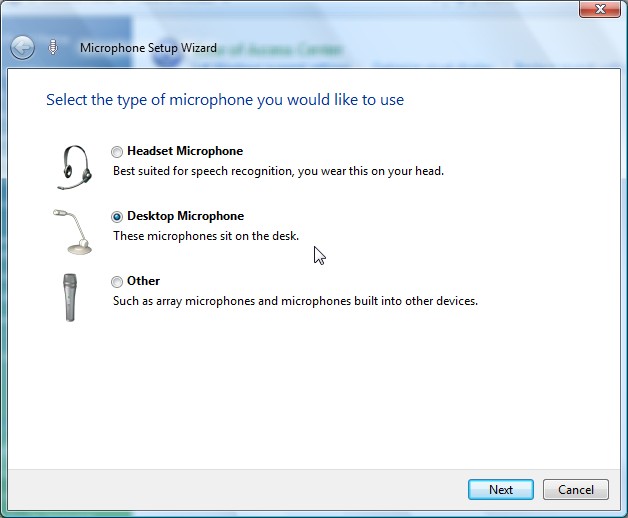
- Follow the wizard to set up your microphone as a desktop microphone.



Thanks a lot for this post!
I thought I was missing drivers, didn’t realise that it was such an easy fix!
This worked for Windows 7.
Thank You very much for this help !!!
A little effort for a great Help !
Have a nice day.
Clement,