Video generation models are evolving quickly, but many of them require large GPU memory and complicated setups. The LTX-2.3 model is a lightweight alternative that can run efficiently using GGUF quantized models.
If you’re thinking about purchasing a new GPU, we’d greatly appreciate it if you used our Amazon Associate links. The price you pay will be exactly the same, but Amazon provides us with a small commission for each purchase. It’s a simple way to support our site and helps us keep creating useful content for you. Recommended GPUs: RTX 5090, RTX 5080, and RTX 5070. #ad
With the GGUF format, LTX-2.3 becomes much easier to run locally, even on GPUs with limited VRAM. When combined with ComfyUI, you can build flexible workflows that generate videos from either text prompts or input images.
In this guide, you will learn how to run LTX-2.3 GGUF in ComfyUI for image-to-video generation. The same workflow can also be used for text-to-video, allowing you to create short AI videos directly from prompts.
We will walk through the required models, how to load the workflow, and the basic settings needed to generate your first video.
LTX-2.3 Models
- GGUF Model: The GGUF models can be found here. I have a RTX 5090, and I used the Q8 variant. I downloaded ltx-2.3-22b-dev-Q8_0.gguf. If you have less VRAM, use other variants like Q6 or Q4. Put the GGUF models in ComfyUI\models\unet\ .
- Text Encoders: Download gemma_3_12B_it.safetensors and ltx-2.3_text_projection_bf16.safetensors; put them in ComfyUI\models\text_encoders\ .
- VAE: Download both the video VAE and audio VAE from LTX-2.3 VAE Folder, put them in ComfyUI\models\vae\ .
- Latent Upscale Mode: Download ltx-2.3-spatial-upscaler-x2-1.0.safetensors , and put it under ComfyUI\models\latent_upscale_models\ .
- LoRA: Download ltx-2.3-22b-distilled-lora-384.safetensors . Place them in ComfyUI\models\loras\ .
LTX-2.3 Image-to-Video GGUF Installation
- Update your ComfyUI to the latest version if you haven’t already. (Run update\update_comfyui.bat for Windows). You also need to update ComfyUI-GGUF, ComfyUI-LTXVideo, and ComfyUI-KJNodes to the latest versions.
- Download the json file, and open it using ComfyUI.
- Use ComfyUI Manager to install missing nodes.
- Restart ComfyUI.
LTX-2.3 Workflow Nodes
Load Models Group
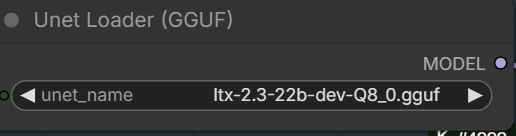
Select the GGUF model you downloaded.
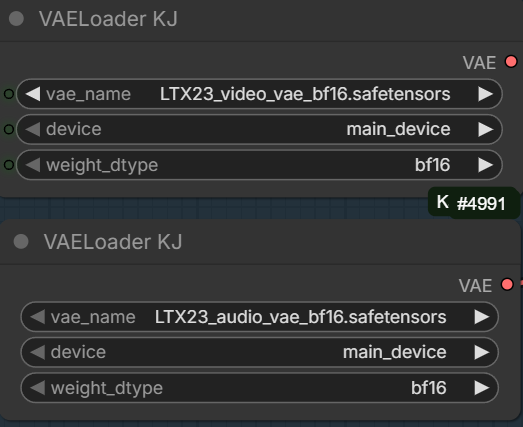
Choose the video VAE and the audio VAE.
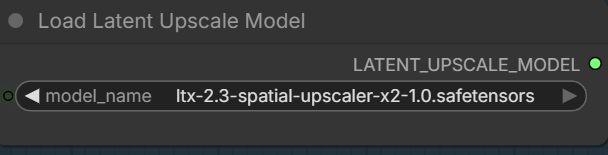
Specify the latent upscale model.
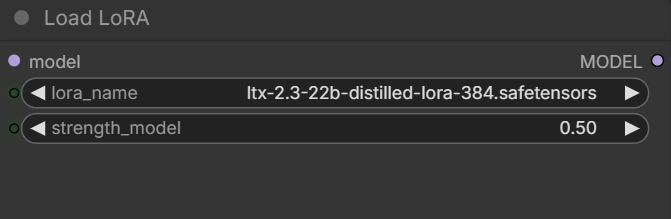
Pick the distilled LoRA.
Load Image Group
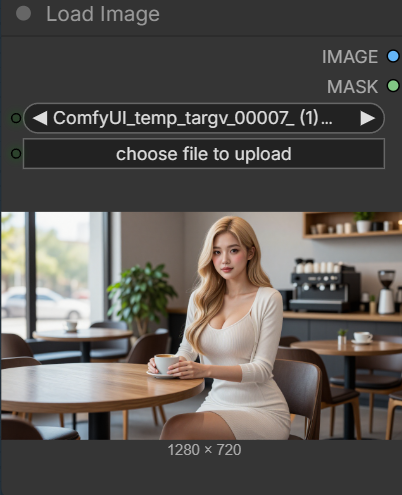
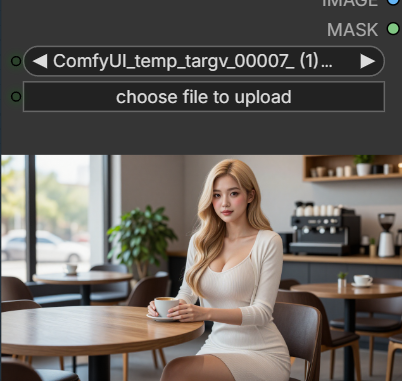
Choose a file if you are using image-to-video
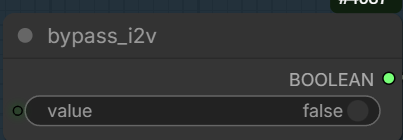
Set this to true if you want to use text-to-video
Set Prompt Group
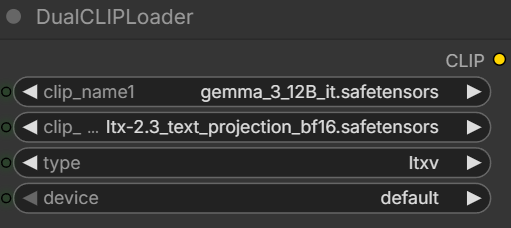
Pick the two text encoders.
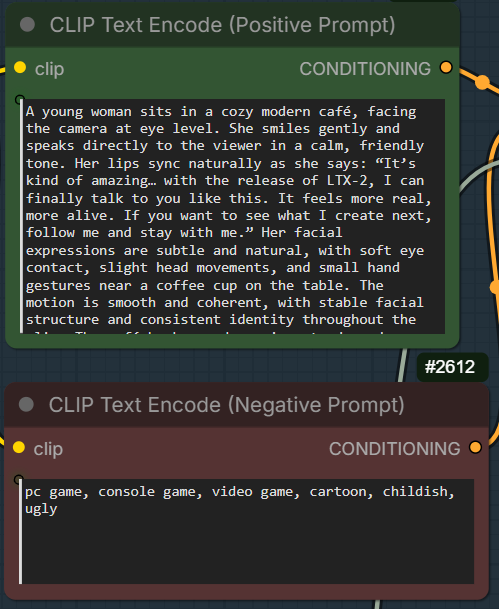
Enter the postive prompt and the negative prompt here.
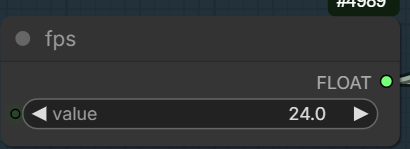
Set the frames per second.
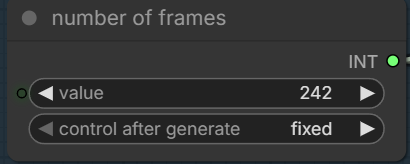
Number of frames to be generated. For 24fps, this is about 10 seconds.
LTX-2.3 Image-to-Video Examples
Input image:
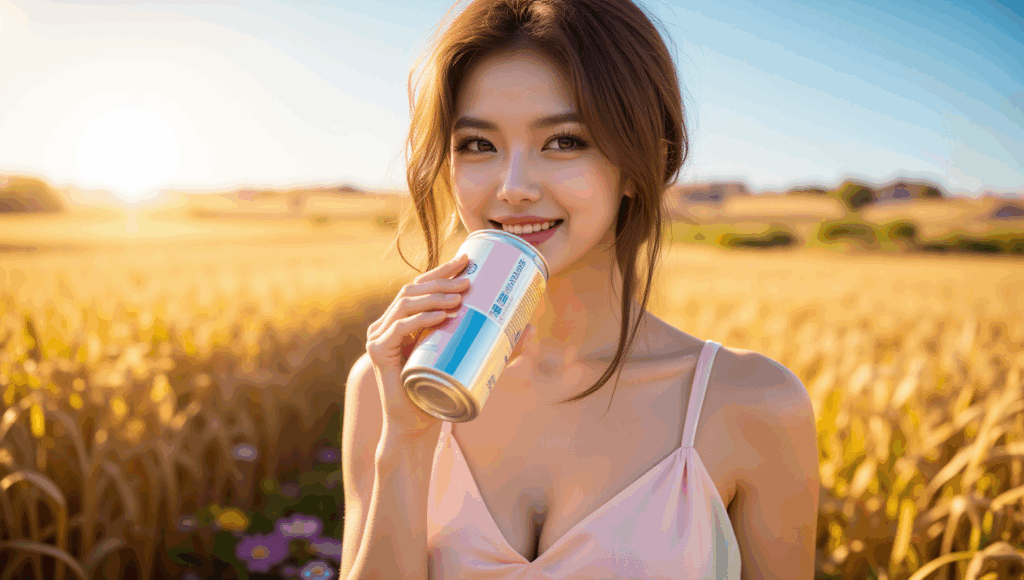
Prompt:
The woman gently tilts the can and takes a refreshing sip, her eyes closing slightly with pleasure. A light breeze makes her hair and dress flutter The camera slowly pans and tilts upward as the sunlight flares more intensely behind her, creating a dreamy golden shimmer. Light lens flares, soft wind movement in the wheat field, subtle camera shake for realism. Warm and radiant motion, smooth transitions, soft glowing ambiance, cinematic light bloom, 16:9 aspect ratio.
LTX-2.3:
LTX-2:
Wan 2.2:
Input image:
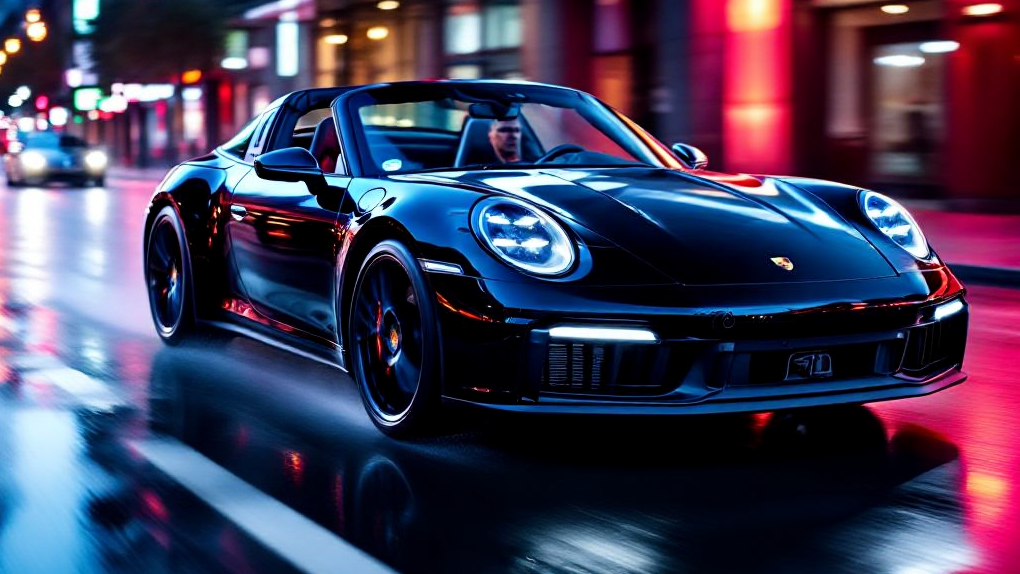
Prompt:
The camera tracks the sleek black sports car as it races down a wet, neon-lit city street at night. Reflections of magenta, cyan, and red lights shimmer on the car’s glossy surface and the wet asphalt. The car accelerates slightly as the lights streak past in the background, with a subtle motion blur and tire spray. Its headlights flare and cast sharp beams forward, illuminating the wet road ahead. The camera rotates around the front-left side of the car, highlighting its curves and aggressive stance. Soft raindrops hit the windshield in slow motion. Soundless, but with cinematic tension. High contrast lighting, futuristic tone, slow motion elements, hyper-realistic motion, 16:9 aspect ratio
LTX-2.3:
LTX-2:
Wan 2.2:
Input image:

Prompt:
The woman runs steadily forward, her steps rhythmic and powerful. Her ponytail bounces with each stride as warm morning light ripples across her body and the bridge. Subtle camera shake adds realism as the scene follows her from a side angle. A light breeze moves her clothing naturally. The sun rises behind her, casting golden flares through the bridge cables. Drops of sweat glisten and roll down her skin in slow motion. The video closes with her stopping to catch her breath, turning toward the camera with a confident smile. Realistic motion, slow-to-normal pacing blend, dynamic light transitions, motivational mood, cinematic tone, 16:9 format
LTX-2.3:
LTX-2:
Wan 2.2:
Input image:
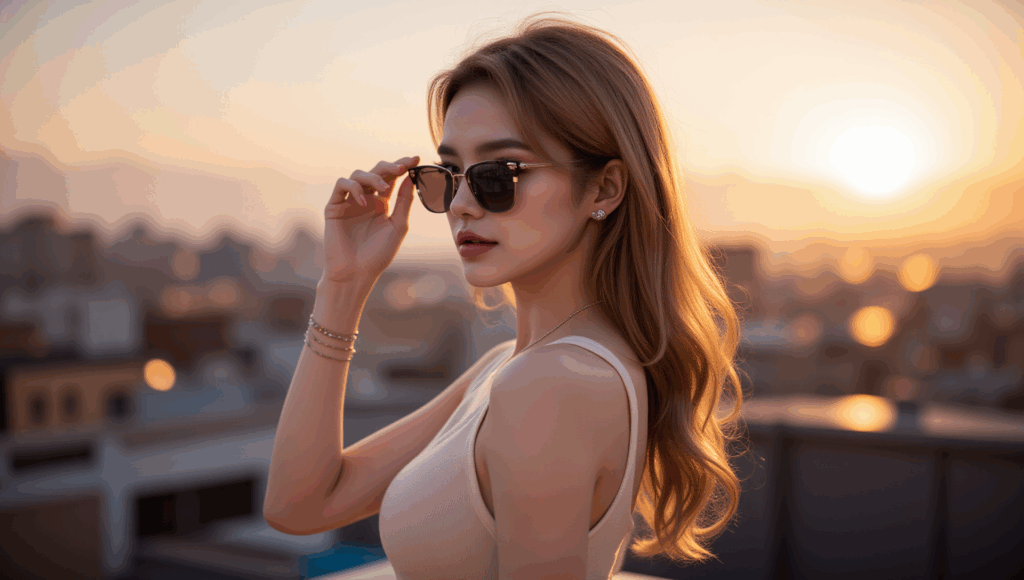
Prompt:
The woman slowly lifts and puts on her sunglasses as the golden sun sets behind her. Her hair moves gently in the wind, and the reflection in the lenses captures the glowing city skyline. As the glasses settle on her face, the light subtly shifts, casting a cinematic flare across the lens. The camera slowly pushes in toward her face, enhancing the cool, composed mood. Lens flares, soft camera movement, golden hour light, confident tone, 16:9 aspect ratio
LTX-2.3:
LTX-2:
Wan 2.2:
Input image:

Prompt:
A young woman sits in a cozy modern café, facing the camera at eye level. She smiles gently and speaks directly to the viewer in a calm, friendly tone. Her lips sync naturally as she says: “It’s kind of amazing… with the release of LTX-2, I can finally talk to you like this. It feels more real, more alive. If you want to see what I create next, follow me and stay with me.” Her facial expressions are subtle and natural, with soft eye contact, slight head movements, and small hand gestures near a coffee cup on the table. The motion is smooth and coherent, with stable facial structure and consistent identity throughout the clip. The café background remains steady and realistic, with minimal camera movement, no exaggerated motion, and no stylization. Natural daylight illuminates her face evenly, maintaining photorealistic skin texture, realistic lip movement, and believable human timing. The overall mood is warm, intimate, and conversational, as if she is casually talking to the viewer in real life.
LTX-2.3:
LTX-2:
No equivalent Wan 2.2 output with dialog.
LTX-2.3 Text-to-Video Examples
Prompt:
Classic Pixar Toy Story–style 3D animation — smooth high-polygon characters, soft warm lighting, simple colorful textures, expressive facial animation, subtle plastic sheen, gentle cloth physics. Andy’s bedroom desk in late afternoon sunlight, neutral background, uncluttered frame, cozy nostalgic atmosphere.
Woody:
A slim cowboy toy with a stitched fabric body and plastic face, warm brown eyes, and a slightly worn but well-kept look. He wears a brown cowboy hat, yellow plaid shirt, red bandana, cowhide vest, blue jeans, and a gold sheriff badge. His expressions are dry and sarcastic, with raised eyebrows, side-glances, and relaxed slouched posture that sells his understated humor.
Buzz Lightyear:
A sturdy, heroic-proportioned space ranger toy with a glossy white plastic suit accented in bright green and purple. His helmet is open, revealing a confident face with strong jawline and clear, focused eyes. He stands upright with calm, controlled movements, projecting optimism and quiet confidence even when delivering simple or ironic lines.
Timestamps & action sequence:
0:00–0:04 —
Medium two-shot at desk height. Woody leans slightly forward with arms crossed, unimpressed expression. Buzz stands upright but neutral. Woody glances at the camera and says dryly:
“So… I keep hearin’ folks say this LTX-2 thing is terrible.”
0:04–0:07 —
Buzz turns his head toward Woody, then back to camera, visor catching the light. He gestures calmly with one hand:
“And yet… here we are. Fully animated.”
0:07–0:10 —
Camera slowly dollies in. Woody shrugs, palms up:
“Made this whole thing in five minutes.”
Buzz gives a confident half-smile and a small nod. Hold on their faces for the final beat.
Audio:
Woody’s relaxed, sarcastic drawl (Tom Hanks vibe). Buzz’s steady, confident heroic voice (Tim Allen vibe). Soft room tone, faint distant kid noise from hallway. No music — clean and conversational.
Output:
LTX-2.3:
LTX-2.0:
Prompt:
SpongeBob SquarePants stands inside the Krusty Krab, facing the camera. He has his classic square yellow sponge body, large blue eyes, buck teeth, white shirt, red tie, brown square pants, tall white socks, and black shoes. The camera is fixed and does not move. SpongeBob gently bounces up and down while smiling and speaking directly to the viewer, saying: “Hi there! Welcome to the Krusty Krab!” His body shape, facial features, and proportions remain consistent throughout the clip with no distortion. The animation uses bright colors, flat cel-shaded textures, and clean outlines, matching the classic 2D cartoon style of the show. The background remains static and colorful, with no camera movement, no depth blur, and no scene changes. The motion is playful, smooth, and exaggerated but controlled, like a short TV cartoon loop.
Output:
LTX-2.3:
LTX-2:
Prompt:
Finn stands in the Candy Kingdom courtyard, facing the camera. He has his iconic white bear hat, blue shirt, blue shorts, and green backpack. The camera is fixed and does not move. He gently sways his upper body side to side while smiling and speaking to the viewer: “Hey! Ready for an adventure?” Facial features, body proportions, and clothing remain consistent throughout the clip. The background is static, colorful, flat-shaded, and in the classic Adventure Time cartoon style. Motion is smooth, playful, and minimal, like a short cartoon talking loop.
Output:
LTX-2.3:
LTX-2:
Prompt:
A 2D animated scene in the visual style of My Little Pony: Friendship Is Magic.
A pastel-colored pony character is standing in a bright, simple outdoor setting in Ponyville, flat colors, clean outlines, soft shading, rounded shapes, consistent cartoon proportions.
Static camera, eye-level, medium shot.
The pony gently sways in place and blinks occasionally, with very simple mouth movement while speaking.
No walking, no head turns, no camera movement, no cuts.
Dialog (friendly, upbeat tone):
“Hi! I can finally talk now. Come follow me!”
Smooth limited animation, TV-cartoon timing, stable character shape, minimal motion, consistent frame-to-frame appearance.
Output:
LTX-2.3:
LTX-2:
Conclusion
LTX-2.3 GGUF makes local AI video generation much more accessible. By using quantized models, you can run image-to-video and text-to-video workflows in ComfyUI without the heavy hardware requirements of many newer video models.
Once the workflow is set up, generating videos becomes straightforward. You can experiment with different prompts, starting images, frame counts, and motion settings to produce a wide variety of results.
Because ComfyUI is modular, it is also easy to expand this workflow. You can add upscaling, frame interpolation, or other post-processing steps to improve video quality and smoothness.
If you are interested in local AI video generation, LTX-2.3 GGUF in ComfyUI is a practical and efficient place to start.
Leave a Reply