Recently the plug and play stops working on my MacBook under Windows 7 Beta several times. I had to restart the machine just to get it to work again. It is very annoying if you are in the middle of something and you have several applications running.
If you’re thinking about purchasing a new GPU, we’d greatly appreciate it if you used our Amazon Associate links. The price you pay will be exactly the same, but Amazon provides us with a small commission for each purchase. It’s a simple way to support our site and helps us keep creating useful content for you. Recommended GPUs: RTX 5090, RTX 5080, and RTX 5070. #ad
I first tried to restart the Plug and Play service, but the option to stop or restart the service has been grayed out. Accidentally, I found that the plug and play started to work again after I restarted Windows Explorer.
Follow these steps to restart Windows Explorer.
- Right click on the taskbar and select Start Task Manager.
- Select explorer.exe and click on End Process.
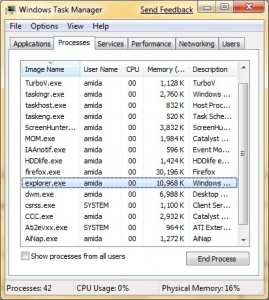
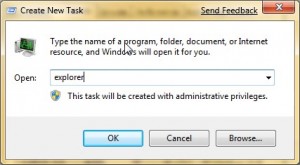
- Sometimes, the system offers to run explorer.exe after your terminate it. If not, click on File -> New Task (Run …) and enter explorer. Click on OK to continue.


Leave a Reply