
FLUX.2-dev Turbo brings a major speed upgrade to the FLUX ecosystem, making high-quality image generation possible in dramatically fewer steps. Released as a Turbo LoRA for FLUX.2-dev, it is designed to deliver strong visual fidelity while reducing inference steps to as low as 8, which is a big win for both experimentation and production workflows.
If you’re thinking about purchasing a new GPU, we’d greatly appreciate it if you used our Amazon Associate links. The price you pay will be exactly the same, but Amazon provides us with a small commission for each purchase. It’s a simple way to support our site and helps us keep creating useful content for you. Recommended GPUs: RTX 5090, RTX 5080, and RTX 5070. #ad
In this guide, we’ll focus specifically on using FLUX.2-dev Turbo LoRA in ComfyUI with GGUF models. GGUF has become increasingly popular for running large models more efficiently on consumer hardware, and pairing it with the Turbo LoRA allows creators to push FLUX-level quality with lower latency and better responsiveness. This article walks through the core concepts and setup considerations so you can integrate Turbo cleanly into your existing ComfyUI pipeline.
Flux.2-dev Turbo Models
- GGUF Models: You can find the GGUF models here. You only need one model. I have a RTX 5090, and I use the Q6 variant. I downloaded flux2_dev_Q6_K.gguf. If your GPU has less VRAM, consider the Q5 or Q4 variants. Put the GGUF model in ComfyUI\models\unet\ .
- Text Encoder: The GGUF text encoders are here. I downloaded Mistral-Small-3.2-24B-Instruct-2506-UD-Q6_K_XL.gguf. Place the model in ComfyUI\models\text_encoders\ .
- VAE: Download flux2-vae.safetensors and put it in ComfyUI\models\vae\ .
- LoRA: Download Flux2TurboComfyv2.safetensors and put it in ComfyUI\models\loras . Note that the official one from fal is not suitable for ComfyUI.
FLUX.2-dev Turbo Installation
- Update your ComfyUI to the latest version if you haven’t already. (Run update\update_comfyui.bat for Windows). Depending on which gguf custom node you installed before, you also need to update the ComfyUI-GGUF or gguf custom node to the latest version if you have not updated it recently.
- Download the json file and open it using ComfyUI.
- Use ComfyUI Manager to install missing nodes.
- Restart ComfyUI.
Flux.2-dev Turbo Nodes
There is only one additional node compared to the previous Flux.2-dev workflow.

Remember to set the steps to 8.
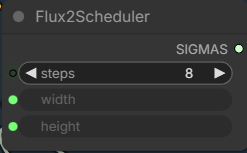
For details on the other nodes, please refer to these two posts: here and here.
Examples
Input:

Prompt:
The man and the girl in black shorts hold a wrapped flower bouquet with white and red daisy standing together in front of the shop. they are smiling and they turn slightly to each other. keep the shop background unchanged.
Output:

Input:

Prompt:
The girl is holding a single small daisy with one hand in front of the phone booth.
Output:

Conclusion
FLUX.2-dev Turbo LoRA proves that speed and quality don’t have to be mutually exclusive. When combined with GGUF-based FLUX.2-dev models in ComfyUI, it enables a faster, more agile workflow without abandoning the rich, natural-language prompting and visual depth that FLUX is known for.
If you’re already running FLUX models in ComfyUI, adding the Turbo LoRA is one of the simplest ways to reduce generation time while maintaining consistent results. For users on limited hardware or anyone iterating heavily on prompts, this setup offers an excellent balance of efficiency, flexibility, and output quality—making FLUX.2-dev Turbo a practical upgrade rather than just an experimental add-on.
Leave a Reply