Ever wanted a barcode scanner of your own to scan products? Now you can with the app RedLaser. Originally available only for jailbroken iPhones, and it’s free. You can get it through the App store now, but you have to pay $1.99 for it.
If you’re thinking about purchasing a new GPU, we’d greatly appreciate it if you used our Amazon Associate links. The price you pay will be exactly the same, but Amazon provides us with a small commission for each purchase. It’s a simple way to support our site and helps us keep creating useful content for you. Recommended GPUs: RTX 5090, RTX 5080, and RTX 5070. #ad
This is a demo video from the official RedLaser web site. I tested on my iPhone 3G and I am quite happy with the results.
When you first run the application, you see this screen.

Tap on the bolt icon on the bottom to enter the scan mode.

Now you have to align the barcode edge with arrows. When RedLaser detects a valid barcode, the arrows turn green. You have to hold your iPhone still for a few seconds.
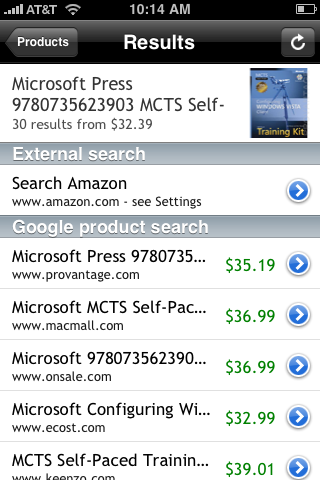
When the scanning is done, it searches the product through Amazon and Google. One nice feature is that you can email the scanned products list which makes it more useful.
There are a lot of negative reviews about the application. Most negative reviews are about not getting the scanning right. I only had a few bad scanning in my tests. If you have troubles doing this, I suggest you do it in a well-lit environment and make sure the barcode is on a flat surface and there is no glare when you see it through the view finder.
Price Scanner iPhone App
Get the best black friday deals – Scan Bar code and Compare Prices, Products & Merchants to Save Money. Comparison Shopping Made Easy.
Easy to use and powerful Bar Code Scanner – Perfect companion for holiday shopping season, helps you “Find The Best Deal On Products and Services” and save money. Find the perfect GIFT at the perfect price.
Download Now:
http://itunes.apple.com/us/app/price-scanner/id404624369?mt=8