I helped a user upgrade his XP machine to Windows 7. The first thing I did was to save his files on an external hard drive using Windows Easy Transfer. When I ran the Windows Easy Transfer Wizard, I got this message: “You’re currently logged on using a temporary profile. Restart your computer and try again.” I knew that I did not log on using a temporary profile, but I followed the instruction to restart the computer anyways. After the computer booted up, I ran the Wizard again. Same problem. I switched from a network account to a local account. The error still remained.
If you’re thinking about purchasing a new GPU, we’d greatly appreciate it if you used our Amazon Associate links. The price you pay will be exactly the same, but Amazon provides us with a small commission for each purchase. It’s a simple way to support our site and helps us keep creating useful content for you. Recommended GPUs: RTX 5090, RTX 5080, and RTX 5070. #ad
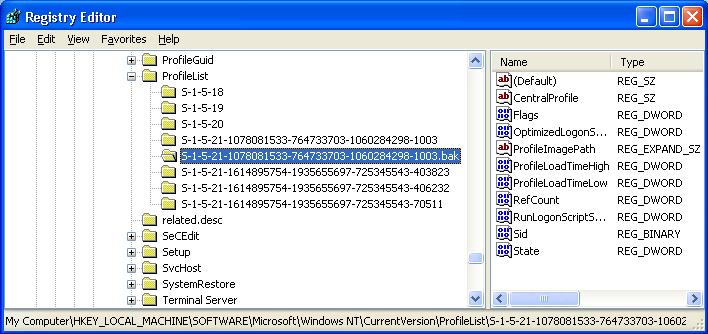
I then searched for a solution and found that the error message was misleading. The error message really meant that there was a temporary profile on the computer. Thus, I used the registry editor to delete the temporary profile registry, and I was able to to run Windows Easy Transfer Wizard.
Here are the steps to delete the temporary profile registry on a Windows XP machine:
- Click on Start and then Run … .
- Enter regedit in the dialog and click on OK.

- Browse to this key: \HKEY_LOCAL\MACHINE\SOFTWARE\Microsoft\Windows NT\CurrentVersion\ProfileList
- Look for any entry with .bak extension.

- Right click on the .bak entry and delete it

Thanks for this post. I have had the same problem and trying to follow the fix on some other sites was not intuitive to say the least.
This worked!
Thank you so much! You are a life saver. I am not a “techie”, so you made this very easy for me! Finally got it to work!