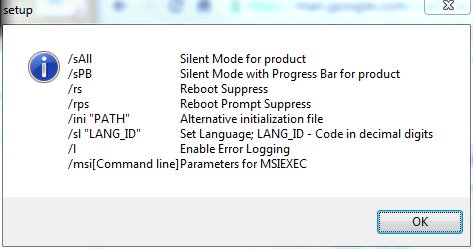
We started to install Acrobat Reader X on new computers. Here are the command line switches for the setup file:
If you’re thinking about purchasing a new GPU, we’d greatly appreciate it if you used our Amazon Associate links. The price you pay will be exactly the same, but Amazon provides us with a small commission for each purchase. It’s a simple way to support our site and helps us keep creating useful content for you. Recommended GPUs: RTX 5090, RTX 5080, and RTX 5070. #ad
/sAll              Silent Mode for product
/sPB               Silent Mode with Progress Bar for product
/rs                Reboot Suppress
/rps               Reboot Prompt Suppress
/ini "PATH"        Alternative initialization file
/sl "LANG_ID"      Set Language; LANG_ID - Code in decimal digits
/l                 Enable Error Logging
/msi[Command line] Parameters for MSIEXEC
If you want to do a silent installation, just type this:
AdbeRdr1000_en_US.exe /sAll /rs
This command installs Acrobat Reader X in silent mode and rebooting after installation is suppressed.
Thanks a lot, silent install option worked great!!!