We recently helped a user upgrade from Office 2007 to Office 2010. After the upgrade, the user reported that the Outlook does not retain autocomplete history. The autocomplete history only stays for the session of the application. If the user quitsOutlook 2010, the autocomplete history is gone.
If you’re thinking about purchasing a new GPU, we’d greatly appreciate it if you used our Amazon Associate links. The price you pay will be exactly the same, but Amazon provides us with a small commission for each purchase. It’s a simple way to support our site and helps us keep creating useful content for you. Recommended GPUs: RTX 5090, RTX 5080, and RTX 5070. #ad
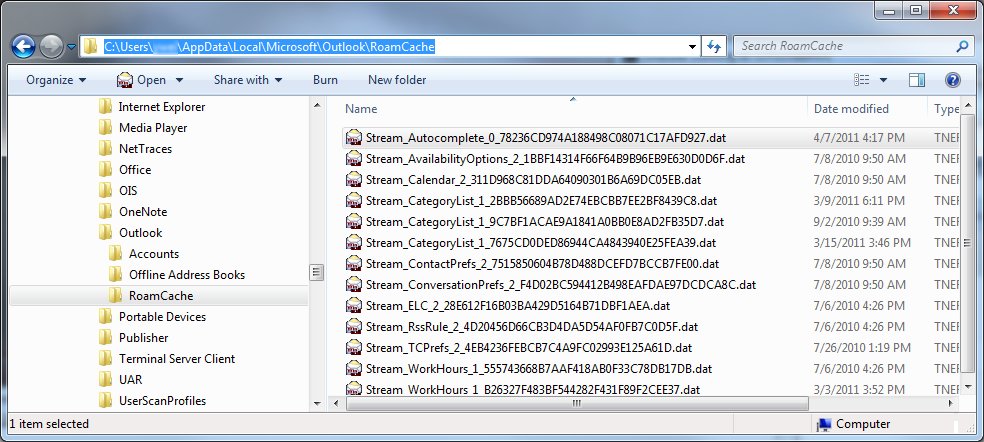
We found out that the problem is because the Stream_Autocomplete*.dat file on the user’s profile is bad. The size of the file is always zero K, and the program cannot write to it. The solution is to delete the file and let Outlook recreate it again.
Here are the steps:
- Close Outlook 2010.
- Browse to this directory (Windows 7):
C:\Users\username\AppData\Local\Microsoft\Outlook\RoamCache
Substitute username with your own user name. Please refer to this post if you do not know how to browse to the directory.
- Right click on the Stream_Autocomplete*.dat file, and select Delete to delete the file.
- Start Outlook 2010, and the file should be generated automatically.
Leave a Reply