After I changed the network adapter’s setting for Windows 8 Developer’s Preview on VirtualBox, the virtual machine could access the network. The only thing missing was the sound. The default audio device was ICH AC97 on VirtualBox, and Windows 8 Developer Preview did not have a driver for it.
If you’re thinking about purchasing a new GPU, we’d greatly appreciate it if you used our Amazon Associate links. The price you pay will be exactly the same, but Amazon provides us with a small commission for each purchase. It’s a simple way to support our site and helps us keep creating useful content for you. Recommended GPUs: RTX 5090, RTX 5080, and RTX 5070. #ad
I tried to change the audio controller for it and finally got one to work. You have to use the Intel HD Audio as the Audio Controller. To change it, shut down the virtual machine and click on Settings. Click on Audio and make sure the Host Audio Driver is set to Windows DirectSound and that the Audio Controller is set to Intel HD Audio.
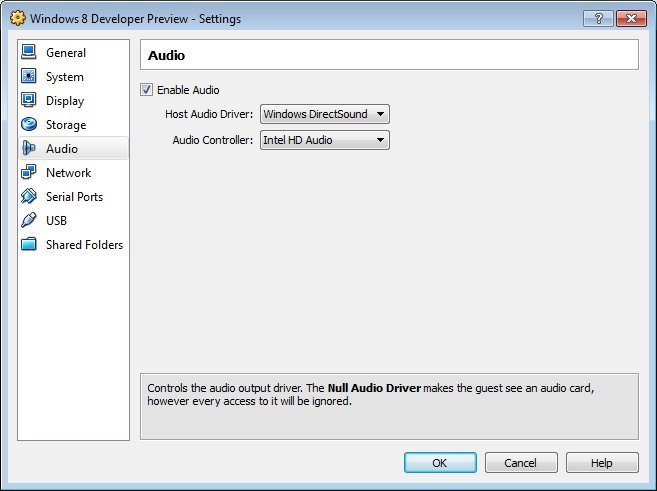
Then, start the virtual machine again. The audio driver will be installed automatically once you boot to the OS.
Leave a Reply