Oracle has published yet another update over the weekend to address some critical vulnerabilities. If you are fed up with all these critical updates, you can completely disable Java content in the browser by using  the Java Control Panel. However, there are still quite a few legitimate web sites that require Java. If you disable Java in the browser, you won’t be able to visit those sites anymore.
If you’re thinking about purchasing a new GPU, we’d greatly appreciate it if you used our Amazon Associate links. The price you pay will be exactly the same, but Amazon provides us with a small commission for each purchase. It’s a simple way to support our site and helps us keep creating useful content for you. Recommended GPUs: RTX 5090, RTX 5080, and RTX 5070. #ad
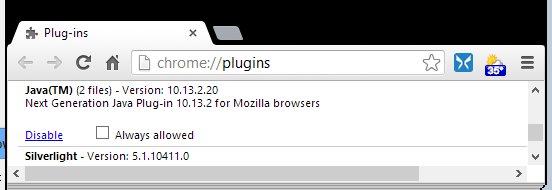
Since I use Chrome most of the time, I decided to disable Java in the Chrome browser. That way, if I needed to visit Java-enabled websites, I could use a different browser like IE instead. Here is how you disable Java in the Chrome browser.
- Enter chrome://plugins in the address bar and press enter.
- Scroll down and find the Java Plug-in.

- Click on Disable to disable the Java Plug-in.
- Close Chrome and Open it up again.
Leave a Reply