
If you try to run Stable Diffusion and got “Not enough memory resources are available to complete this operation” error, this fix might help you solve the problem.
If you’re thinking about purchasing a new GPU, we’d greatly appreciate it if you used our Amazon Associate links. The price you pay will be exactly the same, but Amazon provides us with a small commission for each purchase. It’s a simple way to support our site and helps us keep creating useful content for you. Recommended GPUs: RTX 5090, RTX 5080, and RTX 5070. #ad
When I first learned about arts generated by AI, I was very excited. There are a lot of models out there, but most of them are not free. Stable Diffusion stands out from the competition, because it’s open source and free. You can install it on your computer and try it out by yourself. The GPU requirement is that you need at least 6GB of VRAM to run. My laptop has 12GB VRAM, but yet I still got this message when I tried to run it.
onnxruntime.capi.onnxruntime_pybind11_state.RuntimeException: [ONNXRuntimeError] : 6 : RUNTIME_EXCEPTION : Exception during initialization: D:\a\_work\1\s\onnxruntime\core\providers\dml\DmlExecutionProvider\src\ExecutionProvider.cpp(563)\onnxruntime_pybind11_state.pyd!00007FF946238B01: (caller: 00007FF9462388A2) Exception(2) tid(29dc) 8007000E Not enough memory resources are available to complete this operation.
My laptop has an integrated GPU and a discrete GPU. When I monitored the GPUs during the running of the program, I found that the discrete GPU was not used. In order to use the discrete GPU exclusively for running Stable Diffusion, I need to specify the graphics settings. Here is what I did.
- Click on the magnifying glass and search for graphics settings. Click on Graphics Setting to open it.

- Click on Browse to add Python.
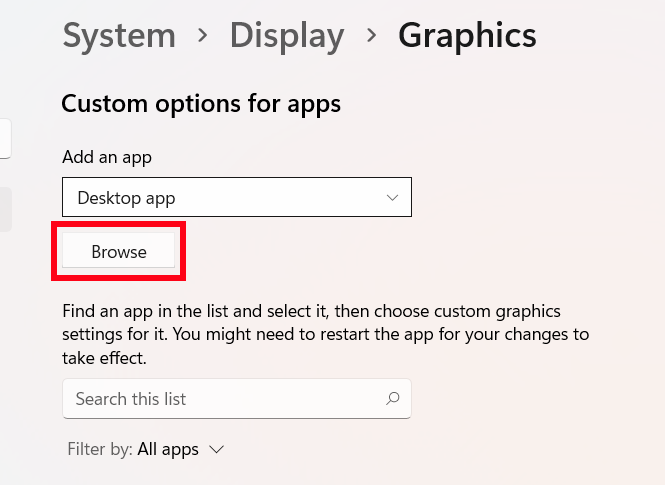
- Browse to the Python folder, click and select python.exe. Click on Add to add python.exe.

- Click on Python to select it and click on Options.
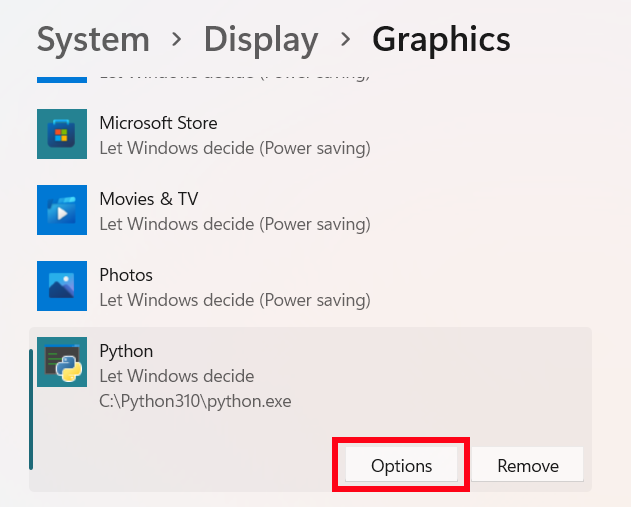
- Click on High performance and click on Save.

Now you can try to run Stable Diffusion again. Did this solve your problem? Let us know in the comment section.
This help me a lot ! Thanks !