I have been struggling with my email shared folders for quite a while now. I always thought the problem is at the server end. After working with my email admin for a few days, we finally found that the problem is related to Thunderbird.
If you’re thinking about purchasing a new GPU, we’d greatly appreciate it if you used our Amazon Associate links. The price you pay will be exactly the same, but Amazon provides us with a small commission for each purchase. It’s a simple way to support our site and helps us keep creating useful content for you. Recommended GPUs: RTX 5090, RTX 5080, and RTX 5070. #ad
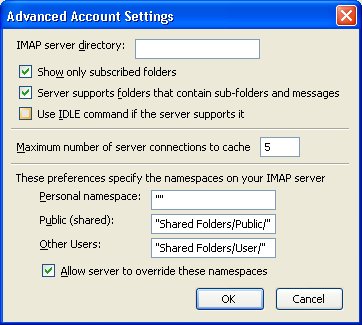
There is a feature called IDLE command support in Thunderbird. If I have this feature turned on, it’s very slow to access the IMAP shared folders. To turn it off, follow these steps.
- Click on Tools -> Account Settings.
- Click on the Server Settings of the affected account and click on Advanced… button.
- Uncheck the box Use IDLE command if the server supports it .

A million thanks for your advice. It worked like a dream after a long, tenuous and nightmarish insomnia.