Have you ever wanted a keyboard with numbers on the same screen for iPhone? I have. I still remembered how hard it is to enter a WEP password which has a lot of numbers mixed with letters. It took like forever to enter it.
If you’re thinking about purchasing a new GPU, we’d greatly appreciate it if you used our Amazon Associate links. The price you pay will be exactly the same, but Amazon provides us with a small commission for each purchase. It’s a simple way to support our site and helps us keep creating useful content for you. Recommended GPUs: RTX 5090, RTX 5080, and RTX 5070. #ad
Now with a program called 5-Row QWERTY Keyboard, you can enter numbers with ease. The program is available for jailbroken iPhone via Cydia.
Here is a screenshot of the keyboard. Notice the extra row of numbers on the top.
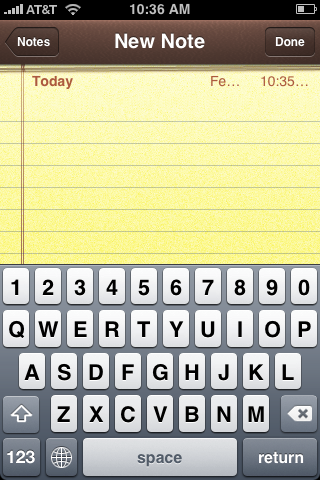
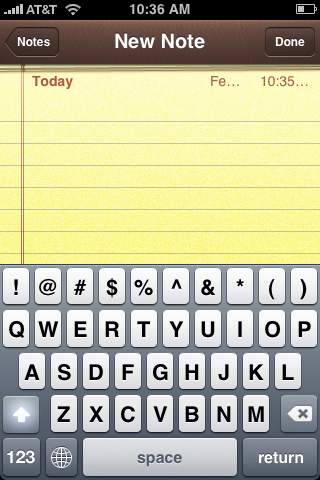
When you activate the shift key, the numbers turn to symbols just like the ones on the regular PC keyboard.
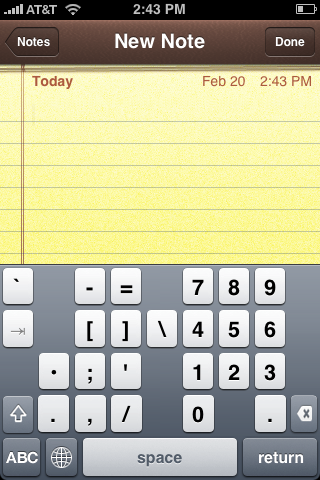
Press 123 and the keyboard turns to the rest of the symbols and the numbers pad.
This is what you get when you activate the shift key.
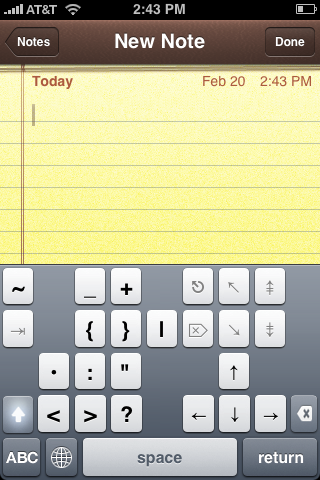
Note that the arrangement of the keys are just like the regular keyboard, so it’s easier for you to find the key you want to type. The only drawback for this keyboard is that the keys are smaller than the keys of the original keyboard. The keyboard is installed as an extra keyboard, so you can easily switch between the regular keyboard and this one.
Leave a Reply