To install VirtualBox 3.0 Guest Additions on a Fedora 12 virtual machine, follow these steps.
If you’re thinking about purchasing a new GPU, we’d greatly appreciate it if you used our Amazon Associate links. The price you pay will be exactly the same, but Amazon provides us with a small commission for each purchase. It’s a simple way to support our site and helps us keep creating useful content for you. Recommended GPUs: RTX 5090, RTX 5080, and RTX 5070. #ad
- In the virtual machine’s menu, click on Devices -> Install Guest Additions .
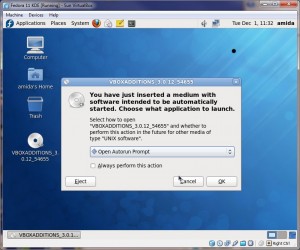
- The guest additions CD image is mounted. A message pops up asking about autorun. Click on Cancel.
- Click on the Applications -> System Tools -> Terminal to bring up a terminal window.
- Now you do the following steps in the terminal. Enter su and press enter. Enter root’s password to get a root prompt.
- We need two extra packages to install the guest additions. Enter the following commands.
yum -y install gcc kernel-devel - Now change the directory to the guest additions media. The path is different, if you use a different version of VirtualBox.
cd /media/VBOXADDITIONS_3.0.12_54655/ - Run the guest additions script for 32bit machines. If you use a 64bit VM, use VBoxLinuxAdditions-amd64.run instead.
sh VBoxLinuxAdditions-x86.run - Reboot the VM and it’s done.
I do not have a full guide on installing Fedora 12 on VirtualBox, but the whole process is very similar to installing Fedora 11. Please see this post for reference.
I followed the above procedures for a F12 guest installation on VirtualBox 3.1.2. However, it still failed in building the VirtualBox Guest Additions Module. After the failure, I tried rerun the yum -y install ……. command and it reported that:
Package kernel-devel-2.6.31.9-174.fc12.i686 already installed and latest version
Did I do anything wrong or is there something new for VirtualBox ver 3.1.2? Your advice and assistance will be very much appreciated. Thanks in advance.
I upgraded my VB to 3.1.2 and reinstalled the guest additions. Everything seems to be fine. What is the error message you got?
Good post. I had one failure when building the kernel modules, and this helped:
yum install gcc -y
yum install kernel sources -y
yum install kernel-devel -y
sh VBoxLinuxAdditions-x86.run
Credit to remy06 at http://forums.virtualbox.org/viewtopic.php?f=3&t=27020
I’m running VB 3.1.4 and after I install Guest Additions and reboot it just gives me a black screen. Any solutions?
Please see this post.
https://www.kombitz.com/2010/03/09/virtualbox-3-1-4-guest-additions-and-fedora-12-guest-problem/
This worked for me also, thank for posting you finding here.