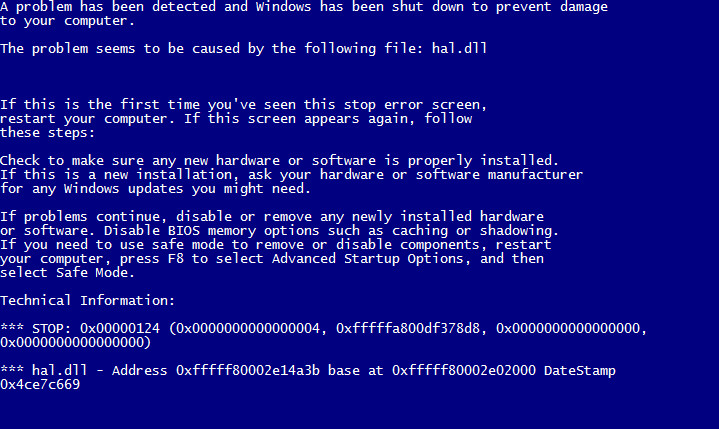
One user bought a Lenovo IdeaCentre computer. It came with an Intel Core i7 6th gen processor, one 120GB SSD and 1TB HDD at a good price. We helped him install Windows 7 on it. The machine was stable when I worked on it, but the user reported it crashed repeatedly when he tried to use it. The machine usually crashed with this message:
If you’re thinking about purchasing a new GPU, we’d greatly appreciate it if you used our Amazon Associate links. The price you pay will be exactly the same, but Amazon provides us with a small commission for each purchase. It’s a simple way to support our site and helps us keep creating useful content for you. Recommended GPUs: RTX 5090, RTX 5080, and RTX 5070. #ad
A problem has been detected and Windows has been shut down to prevent damage to your computer.
The problem seems to be caused by the following file: hal.dll
If you look at the log, you can see this:
Log Name: System
Source: Microsoft-Windows-WER-SystemErrorReporting
Date: 6/2/2016 9:17:02 PM
Event ID: 1001
Task Category: None
Level: Error
Keywords: Classic
User: N/A
Computer: mycomputer
Description:
The computer has rebooted from a bugcheck. The bugcheck was: 0x00000124 (0x0000000000000004, 0xfffffa800df4b8d8, 0x0000000000000000, 0x0000000000000000). A dump was saved in: C:\WINDOWS\MEMORY.DMP. Report Id: 060216-10140-01.
I googled for information and a lot of people are saying this is a hardware problem. I did some hardware diagnostic tests, but I didn’t find anything wrong with the system. I then checked Lenovo’s site for driver updates and applied all available updates. After all the updates are applied, the system is still crashing.
I then tried out several drivers, and finally found out what’s wrong with the system. The problem was due to a video card driver. The video card driver was downloaded from Lenovo, but it’s causing the system to crash. I installed an updated version of the driver from Nvidia and the problem went away.
This is the link for the driver download on nvidia.com.
Leave a Reply