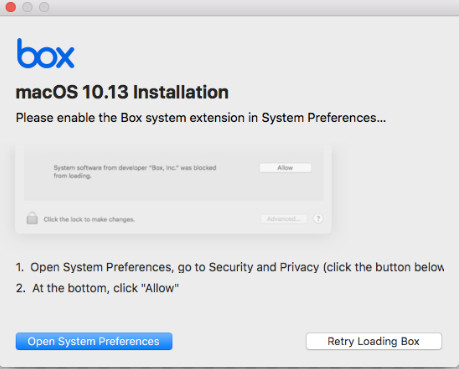
When I tried to install Box drive on a Mac Mini running Mac OS 10.13, I found that the installation was blocked. This is the screenshot with the message.
If you’re thinking about purchasing a new GPU, we’d greatly appreciate it if you used our Amazon Associate links. The price you pay will be exactly the same, but Amazon provides us with a small commission for each purchase. It’s a simple way to support our site and helps us keep creating useful content for you. Recommended GPUs: RTX 5090, RTX 5080, and RTX 5070. #ad

If you click on Open System Preferences, it takes you to the System Preferences.
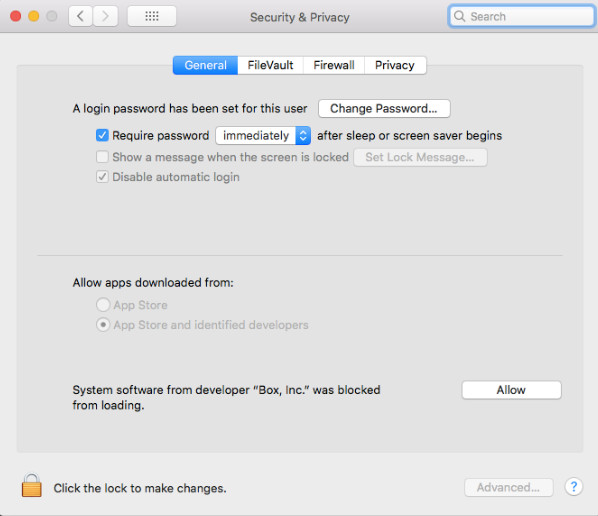
Now, all you have to do is click Allow and you should be OK to finish installation, right? No! I tried to click on the Allow button several times, but it did not do anything. I then tried to reinstall Box Drive, same results. It took me a while to figure this out. It turns out other program is interfering with your ability to click on that Allow button. I saw a post about closing some applications. It didn’t work initially. I finally got it to work after I closed Chrome Browser. The take away is if you run into the same problem, try to close any open applications. You should be able to click on the Allow button after you close other applications.
Leave a Reply