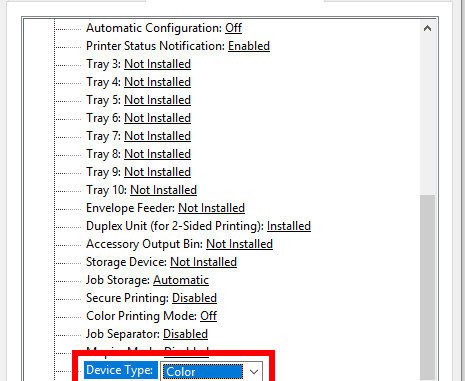
I had some troubles enabling color printing when I use the HP Universal Printing driver. After spending 15 minutes on figuring out how to do it. Decided to write a post about this so I don’t forget it again.
If you’re thinking about purchasing a new GPU, we’d greatly appreciate it if you used our Amazon Associate links. The price you pay will be exactly the same, but Amazon provides us with a small commission for each purchase. It’s a simple way to support our site and helps us keep creating useful content for you. Recommended GPUs: RTX 5090, RTX 5080, and RTX 5070. #ad
This is how you do it on a Windows 10 machine.
- Click on Windows logo and search for Printers and scanners
- Click on Printers and scanners
- Click on the printer and click on Manage
- Click on Printer properties
- Click on Device Settings tab
- Scroll down and find the Device Type
- Set the Device Type to Color
Close the dialog and you should be able to print in color now.
Leave a Reply