I hope everyone is doing well during this pandemic. It has been hectic for the past few weeks. Things have finally quite down a bit. One user reported that the Software Center has rebooted her computer twice. We tried to help her to figure out what was wrong.
If you’re thinking about purchasing a new GPU, we’d greatly appreciate it if you used our Amazon Associate links. The price you pay will be exactly the same, but Amazon provides us with a small commission for each purchase. It’s a simple way to support our site and helps us keep creating useful content for you. Recommended GPUs: RTX 5090, RTX 5080, and RTX 5070. #ad
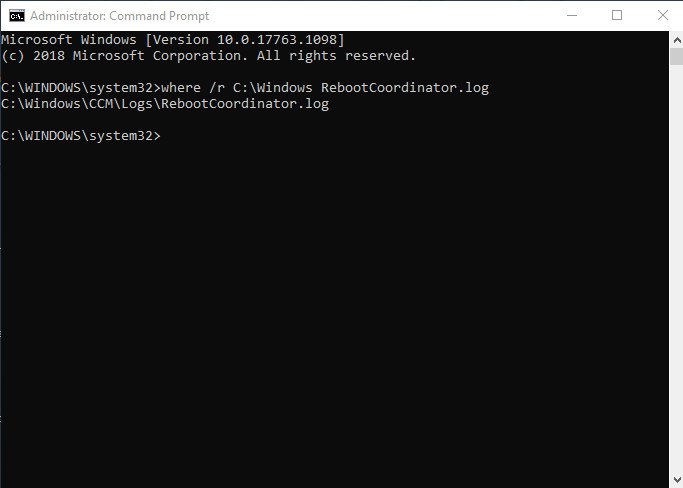
Our SCCM admin has suggested looking at the RebootCoordinator.log to identify the problem. However, I could not find the log file in the C:\Windows\System32\CCM\logs or C:\Windows\SysWOW64\CCM\logs. I don’t have direct access to the file system either. I can only use DOS command to find the file. I learned a new command, where, which I have not used before. By using the where command, I was able to find the file easily. This is what I typed to find the file.
where /r C:\Windows RebootCoordinator.log
/r parameter does the search recursively starting from the specified directory, C:\Windows. Here is the help page of where command:
WHERE [/R dir] [/Q] [/F] [/T] pattern...

Description:
    Displays the location of files that match the search pattern.
    By default, the search is done along the current directory and
    in the paths specified by the PATH environment variable.

Parameter List:
    /R       Recursively searches and displays the files that match the
             given pattern starting from the specified directory.

    /Q       Returns only the exit code, without displaying the list
             of matched files. (Quiet mode)

    /F       Displays the matched filename in double quotes.

    /T       Displays the file size, last modified date and time for all
             matched files.

    pattern  Specifies the search pattern for the files to match.
             Wildcards * and ? can be used in the pattern. The
             "$env:pattern" and "path:pattern" formats can also be
             specified, where "env" is an environment variable and
             the search is done in the specified paths of the "env"
             environment variable. These formats should not be used
             with /R. The search is also done by appending the
             extensions of the PATHEXT variable to the pattern.

     /?      Displays this help message.

  NOTE: The tool returns an error level of 0 if the search is
        successful, of 1 if the search is unsuccessful and
        of 2 for failures or errors.

Examples:
    WHERE /?
    WHERE myfilename1 myfile????.*
    WHERE $windir:*.*
    WHERE /R c:\windows *.exe *.dll *.bat
    WHERE /Q ??.???
    WHERE "c:\windows;c:\windows\system32:*.dll"
    WHERE /F /T *.dll
Leave a Reply