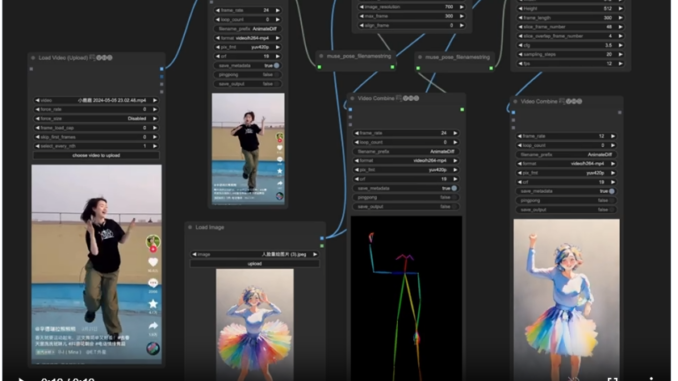
According to the MusePose readme on github: MusePose is an image-to-video generation framework for virtual human under control signal such as pose. The current released model was an implementation of AnimateAnyone by optimizing Moore-AnimateAnyone. I first learned about this on reddit and found it interesting. However, the installation was quite difficult. With help on this page, I was finally able to install it.
If you’re thinking about purchasing a new GPU, we’d greatly appreciate it if you used our Amazon Associate links. The price you pay will be exactly the same, but Amazon provides us with a small commission for each purchase. It’s a simple way to support our site and helps us keep creating useful content for you. Recommended GPUs: RTX 5090, RTX 5080, and RTX 5070. #ad
Requirements
- A working ComfyUI installation – https://github.com/comfyanonymous/ComfyUI
- Nvidia GPU – 3090, 4090 You might be able to get this to work with a GPU with 16GB VRAM, but 24GB is recommended.
Installation
I have the ComfyUI_windows_portable on my computer.
Python version: 3.11.6
cuda : 12.1
Python executable: D:\ComfyUI_windows_portable\python_embeded\python.exe
torch version: 2.1.1+cu121
Note that the torch version is very important. You need this exact version to follow this guide. If your version does not match, you can use this command to install the matching version. THIS MIGHT BREAK OTHER CUSTOM NODES IF THEY REQUIRE A SPECIFIC VERSION OTHER THAN THIS ONE.
D:\ComfyUI_windows_portable\python_embeded\Scripts\pip install torch==2.1.1 torchvision torchaudio --index-url https://download.pytorch.org/whl/cu121
Open up a command prompt. Type the following to change directory to the custom_nodes directory and install the necessary packages.
D:

cd ComfyUI_windows_portable\ComfyUI\custom_nodes

git clone https://github.com/TMElyralab/Comfyui-MusePose

cd Comfyui-MusePose

D:\ComfyUI_windows_portable\python_embeded\Scripts\pip install -r requirements.txt

D:\ComfyUI_windows_portable\python_embeded\Scripts\pip install aliyun-python-sdk-core-v3==2.13.10

D:\ComfyUI_windows_portable\python_embeded\Scripts\pip install --no-cache-dir -U openmim

D:\ComfyUI_windows_portable\python_embeded\Scripts\mim install mmengine

D:\ComfyUI_windows_portable\python_embeded\Scripts\mim install mmcv==2.1.0 -f https://download.openmmlab.com/mmcv/dist/cu121/torch2.1/index.html

D:\ComfyUI_windows_portable\python_embeded\Scripts\mim install "mmdet>=3.1.0"
Are you able to get MusePose to work following this guide? What is your experience with MusePose? My standard is quite high and I have not created an animation that I like. I will update this post once I have a good example.
Leave a Reply