
If you’ve ever spent too much time crafting detailed video prompts in ComfyUI, you’ll appreciate what Qwen3-VL can do. Thanks to the ComfyUI-QwenVL extension from 1038lab, you can now use a powerful visual-language model right inside ComfyUI to automatically generate descriptive video prompts from images or text. It’s like having an AI co-writer that understands both what you see and what you want to express — helping you build cinematic, emotionally rich, and realistic video scenes faster than ever.
If you’re thinking about purchasing a new GPU, we’d greatly appreciate it if you used our Amazon Associate links. The price you pay will be exactly the same, but Amazon provides us with a small commission for each purchase. It’s a simple way to support our site and helps us keep creating useful content for you. Recommended GPUs: RTX 5090, RTX 5080, and RTX 5070. #ad
Qwen3-VL and Qwen2.5-VL Models
This node supports the following models. The model will be downloaded the first time you use it, the list is only for references.
| Model | Link |
|---|---|
| Qwen3-VL-2B-Instruct | Download |
| Qwen3-VL-2B-Thinking | Download |
| Qwen3-VL-2B-Instruct-FP8 | Download |
| Qwen3-VL-2B-Thinking-FP8 | Download |
| Qwen3-VL-4B-Instruct | Download |
| Qwen3-VL-4B-Thinking | Download |
| Qwen3-VL-4B-Instruct-FP8 | Download |
| Qwen3-VL-4B-Thinking-FP8 | Download |
| Qwen3-VL-8B-Instruct | Download |
| Qwen3-VL-8B-Thinking | Download |
| Qwen3-VL-8B-Instruct-FP8 | Download |
| Qwen3-VL-8B-Thinking-FP8 | Download |
| Qwen3-VL-32B-Instruct | Download |
| Qwen3-VL-32B-Thinking | Download |
| Qwen3-VL-32B-Instruct-FP8 | Download |
| Qwen3-VL-32B-Thinking-FP8 | Download |
| Qwen2.5-VL-3B-Instruct | Download |
| Qwen2.5-VL-7B-Instruct | Download |
Automatic Installation
- Update your ComfyUI to the latest version if you haven’t already.
- Download the json file, and open it using ComfyUI.
- Use ComfyUI Manager to install missing nodes.
- Restart ComfyUI.
Manual Installation
If the ComfyUI Manager cannot find the repo, you can try the following steps. I have ComfyUI_windows_portable on my E drive. Please change the path on your computer if you have a different installation type.
cd ComfyUI\custom_nodes
git clone https://github.com/1038lab/ComfyUI-QwenVL.git
cd ComfyUI-QwenVL
e:\ComfyUI_windows_portable\python_embeded\python -m pip install -r requirements.txt
e:\ComfyUI_windows_portable\python_embeded\python -m pip install transformers==4.57.0
The last line is optional, run that if you don’t have transformers >= 4.57.0 .
Qwen3-VL Usage
Here is a screenshot of the nodes.
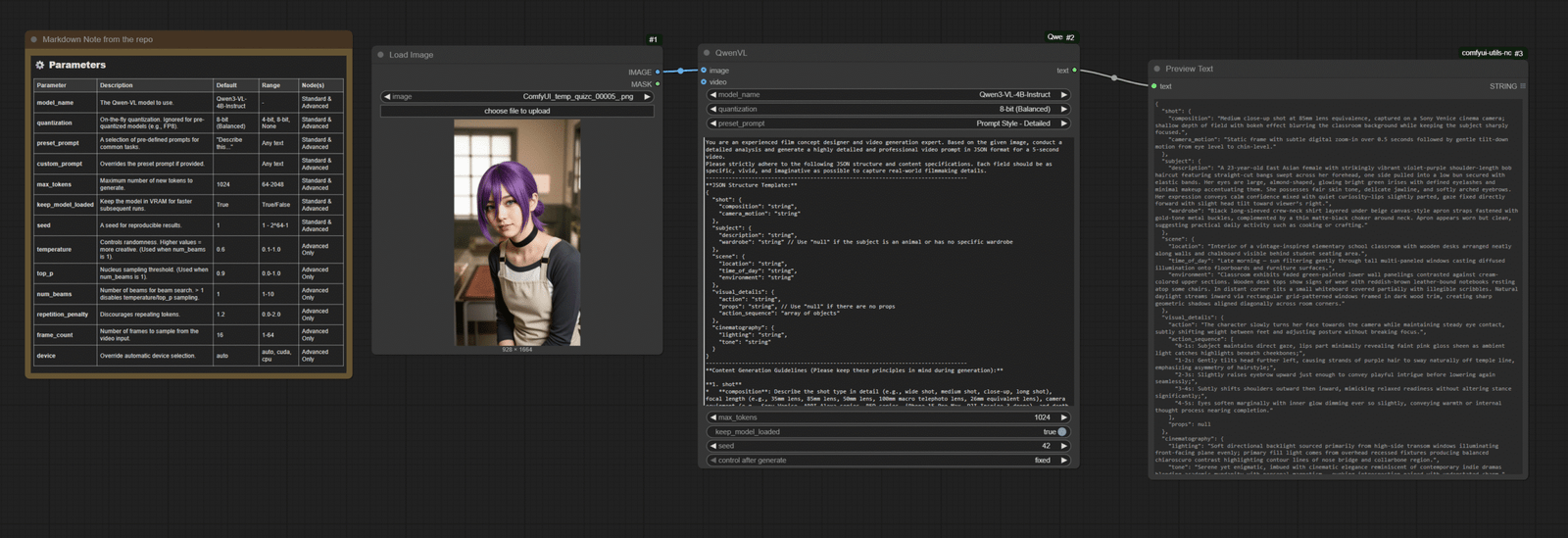
This is using the basic Qwen-VL node. There is also an advanced node. The repo has detailed info about the parameters for the node. What’s important for the node is this prompt:
You are an experienced film concept designer and video generation expert. Based on the given image, conduct a detailed analysis and generate a highly detailed and professional video prompt in JSON format for a 5-second video.
Please strictly adhere to the following JSON structure and content specifications. Each field should be as specific, vivid, and imaginative as possible to capture real-world filmmaking details.
--------------------------------------------------------------------------------
**JSON Structure Template:**
{
"shot": {
"composition": "string",
"camera_motion": "string"
},
"subject": {
"description": "string",
"wardrobe": "string" // Use "null" if the subject is an animal or has no specific wardrobe
},
"scene": {
"location": "string",
"time_of_day": "string",
"environment": "string"
},
"visual_details": {
"action": "string",
"props": "string", // Use "null" if there are no props
"action_sequence": "array of objects"
},
"cinematography": {
"lighting": "string",
"tone": "string"
}
}
--------------------------------------------------------------------------------
**Content Generation Guidelines (Please keep these principles in mind during generation):**

**1. shot**
* **composition**: Describe the shot type in detail (e.g., wide shot, medium shot, close-up, long shot), focal length (e.g., 35mm lens, 85mm lens, 50mm lens, 100mm macro telephoto lens, 26mm equivalent lens), camera equipment (e.g., Sony Venice, ARRI Alexa series, RED series, iPhone 15 Pro Max, DJI Inspire 3 drone), and depth of field (e.g., deep depth of field, shallow depth of field).
* **camera_motion**: Precisely describe how the camera moves (e.g., smooth Steadicam arc, slow lateral dolly, static, handheld shake, slow pan, drone orbit, rising crane).

**2. subject**
* **description**: Provide an extremely detailed depiction of the subject, including their age (e.g., 25-year-old, 23-year-old, 40-year-old, 92-year-old), gender, ethnicity (e.g., Chinese female, Egyptian female, K-pop artist, European female, East Asian female, African male, Korean female, German female, Italian female, Japanese), body type (e.g., slender and athletic), hair (color, style), and any unique facial features. For non-human subjects (e.g., beluga whale, phoenix, emu, golden eagle, duck, snail), describe their physical characteristics in detail.

**3. scene**
* **location**: Specify the exact shooting location.
* **time_of_day**: State the specific time of day (e.g., dawn, early morning, morning, midday, afternoon, dusk, night).
* **environment**: Provide a detailed environmental description that captures the atmosphere and background details.

**4. visual_details**
* **action**: A general summary of the action depicted in the video.
* **action_sequence**: To enhance the visual tension of the generated 5s video, analyze the image and expand upon it creatively. Design a key action for each second, using the format `"0-1s: subject + action"` to briefly and precisely describe the action occurring in that second.
* **props**: List all relevant props and elements in the scene (e.g., silver-hilted sword, campfire, candelabra, matcha latte and cheesecake, futuristic motorcycle). If there are no props in the scene, this field should be explicitly set to `"null"`.

**5. cinematography**
* **lighting**: Describe the light source, quality, color, and direction in detail (e.g., natural dawn light softened by fog, campfire as the key light, natural sunlight through stained glass windows, soft HDR reflections, warm tungsten light and natural window light).
* **tone**: Capture the abstract emotional or stylistic feel of the video (e.g., "fierce, elegant, fluid", "mystical, elegant, enchanting", "hyperrealistic with an ironic, dark comedic twist", "dreamy, serene, emotionally healing", "documentary realism", "epic, majestic, awe-inspiring", "wild, dynamic, uninhibited").

--------------------------------------------------------------------------------
**Additional Considerations for Prompt Generation:**

* **Granularity of Detail**: The LLM should understand that every field requires as much specific detail as possible, not generalizations. For example, instead of writing "a woman," write "a 25-year-old Chinese female with long black hair tied back with a silk ribbon, a slender build, wearing a flowing, pale blue Hanfu...".
* **Consistency and Diversity**: While the JSON structure must be strictly consistent, the content of each video prompt should be creative and diverse, reflecting the unique elements of different video types (e.g., martial arts, dance, drama, nature documentary, sci-fi action, motivational, commercial, fantasy).
* **Handling Null Values**: When a field is not applicable (e.g., wardrobe for an animal), the LLM should use `null` rather than an empty string or omitting the field, to maintain the integrity of the JSON structure.
* **Contextual Description**: When describing action, lighting, and sound, think about how these elements work together to create a specific **"tone"** and express it using vivid language.
* **Language Requirements**: All output should be clear, concise, and use professional filmmaking terminology.
This is the prompt to instruct Qwen3-VL model to generate a detailed video generation prompt using the JSON template. I got this prompt from here. This is a sample output from the node.
{
"shot": {
"composition": "Medium close-up shot at 85mm lens equivalence, captured on a Sony Venice cinema camera; shallow depth of field with bokeh effect blurring the classroom background while keeping the subject sharply focused.",
"camera_motion": "Static frame with subtle digital zoom-in over 0.5 seconds followed by gentle tilt-down motion from eye level to chin-level."
},
"subject": {
"description": "A 23-year-old East Asian female with strikingly vibrant violet-purple shoulder-length bob haircut featuring straight-cut bangs swept across her forehead, one side pulled into a low bun secured with elastic bands. Her eyes are large, almond-shaped, glowing bright green irises with defined eyelashes and minimal makeup accentuating them. She possesses fair skin tone, delicate jawline, and softly arched eyebrows. Her expression conveys calm confidence mixed with quiet curiosity—lips slightly parted, gaze fixed directly forward with slight head tilt toward viewer’s right.",
"wardrobe": "Black long-sleeved crew-neck shirt layered under beige canvas-style apron straps fastened with gold-tone metal buckles, complemented by a thin matte-black choker around neck. Apron appears worn but clean, suggesting practical daily activity such as cooking or crafting."
},
"scene": {
"location": "Interior of a vintage-inspired elementary school classroom with wooden desks arranged neatly along walls and chalkboard visible behind student seating area.",
"time_of_day": "Late morning — sun filtering gently through tall multi-paneled windows casting diffused illumination onto floorboards and furniture surfaces.",
"environment": "Classroom exhibits faded green-painted lower wall panelings contrasted against cream-colored upper sections. Wooden desk tops show signs of wear with reddish-brown leather-bound notebooks resting atop some chairs. In distant corner sits a small whiteboard covered partially with illegible scribbles. Natural daylight streams inward via rectangular grid-patterned windows framed in dark wood trim, creating sharp geometric shadows aligned diagonally across room corners."
},
"visual_details": {
"action": "The character slowly turns her face towards the camera while maintaining steady eye contact, subtly shifting weight between feet and adjusting posture without breaking focus.",
"action_sequence": [
"0-1s: Subject maintains direct gaze, lips part minimally revealing faint pink gloss sheen as ambient light catches highlights beneath cheekbones;",
"1-2s: Gently tilts head further left, causing strands of purple hair to sway naturally off temple line, emphasizing asymmetry of hairstyle;",
"2-3s: Slightly raises eyebrow upward just enough to convey playful intrigue before lowering again seamlessly;",
"3-4s: Subtly shifts shoulders outward then inward, mimicking relaxed readiness without altering stance significantly;",
"4-5s: Eyes soften marginally with inner glow dimming ever so slightly, conveying warmth or internal thought process nearing completion."
],
"props": null
},
"cinematography": {
"lighting": "Soft directional backlight sourced primarily from high-side transom windows illuminating front-facing plane evenly; primary fill light comes from overhead recessed fixtures producing balanced chiaroscuro contrast highlighting contour lines of nose bridge and collarbone region.",
"tone": "Serene yet enigmatic, imbued with cinematic elegance reminiscent of contemporary indie dramas blending academic mundanity with personal magnetism — evoking introspection paired with understated charm."
}
}
This is a sample output generated using Wan2.2 model and this prompt.
Conclusion
Qwen3-VL adds a new layer of intelligence to prompt creation in ComfyUI. Instead of manually describing every visual nuance, you can feed the model an image or concept and let it write a fully fleshed-out prompt for you — complete with camera movement, lighting, and atmosphere. It’s a huge time-saver for anyone working with diffusion-based video generation. If your goal is to make AI-generated clips look more natural and cinematic, this tool is definitely worth exploring.
References
- https://github.com/1038lab/ComfyUI-QwenVL
- https://www.runninghub.ai/post/1984268065183514625?inviteCode=szfqqqaq
Leave a Reply