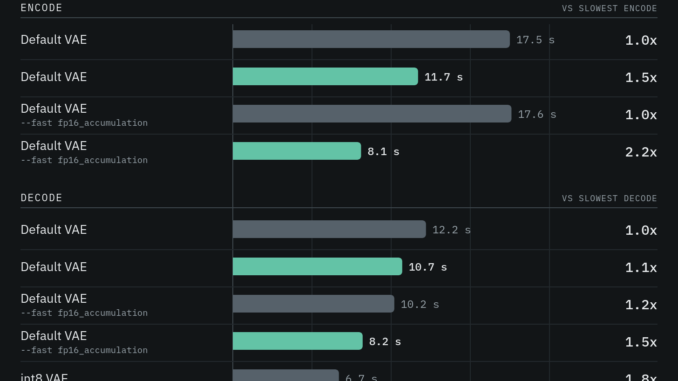
ComfyUI has released a major performance improvement for the MiniMax H3 video VAE, making video encoding up to 2.2 times faster and decoding up to 2.7 times faster on Nvidia GPUs.
If you’re thinking about purchasing a new GPU, we’d greatly appreciate it if you used our Amazon Associate links. The price you pay will be exactly the same, but Amazon provides us with a small commission for each purchase. It’s a simple way to support our site and helps us keep creating useful content for you. Recommended GPUs: RTX 5090, RTX 5080, and RTX 5070. #ad
The update, announced by ComfyUI on September 22, targets one of the slower parts of a MiniMax H3 workflow: converting between video frames and the compressed latent representation used by the model.
According to ComfyUI, a 1344×768 video with 129 frames can now complete a VAE encode-and-decode round trip in about 12.7 seconds, compared with 24.3 seconds before the optimization.
That means the VAE portion of the workflow can take roughly half as long.
What changed?
The speedup comes from several changes to the MiniMax H3 VAE implementation rather than from changing the underlying video generation model.
A fused encoder kernel
Previously, the encoder performed several operations separately between convolution layers. These included normalization, activation and edge padding.
Each operation required another pass over a large amount of video data.
The new implementation combines those operations into a fused kernel. Instead of repeatedly moving data through memory, the operation produces data directly in the layout required by the following convolution.
ComfyUI reports that this alone makes the encoder about 1.5 times faster while producing effectively identical results.
Faster FP16 accumulation
The update also introduces custom convolution operations that can take advantage of ComfyUI’s --fast fp16_accumulation option.
Previously, this option primarily benefited matrix multiplication operations because PyTorch’s cuDNN convolution path did not provide a way to request FP16 accumulation in the same manner.
The new convolution implementation can use FP16 accumulation while also folding operations such as bias and skip connections into the convolution.
With this optimization enabled, ComfyUI reports encoder performance reaching roughly 2.2 times the previous speed.
An optimized INT8 decoder
The biggest improvement on the decoding side comes from a new INT8 version of the MiniMax H3 video VAE.
The decoder uses 8-bit weights, while normalization, activation and skip-connection operations are folded into the matrix multiplications. This reduces the amount of intermediate data that needs to be written back to memory.
Attention operations also run in INT8.
ComfyUI reports that the new decoder is approximately 1.4 times faster than the previous INT8 VAE implementation, with the overall improvement depending on the workflow and hardware.
The difference is most noticeable with longer videos
The benchmark from ComfyUI used an RTX 5090 with a 1344×768 video containing 129 frames.
The complete VAE encode/decode round trip dropped from 24.3 seconds to 12.7 seconds.
That is important because VAE processing can become increasingly noticeable as video resolution and frame count increase.
For a short generation, saving several seconds may not seem significant. But when generating many clips, testing different prompts, or repeatedly processing videos through an image-to-video or reference-to-video workflow, the savings can add up quickly.
The improvement is also not limited to the RTX 5090. ComfyUI notes that the fused encoder reduces memory traffic, which can benefit Nvidia GPUs more broadly.
What about image quality?
The performance improvement does not appear to come at a meaningful visual-quality cost.
ComfyUI says the fused encoder is lossless in the sense that it computes the same operations in a different order.
The new INT8 paths introduce some additional numerical error, but the reported difference is extremely small compared with the normal reconstruction loss of the VAE itself.
In ComfyUI’s testing, the INT8 decoder reached 67.7 dB PSNR compared with the standard decoder, while the faster encoder reached approximately 68 dB.
For comparison, the VAE’s own reconstruction of real video was around 38 dB.
In practical terms, ComfyUI says users are unlikely to notice a visual difference.
How to enable the faster MiniMax H3 VAE
The update is relatively straightforward to use.
First, update ComfyUI to version 0.36.0 or newer.
Then start ComfyUI with:
--fast fp16_accumulation
This enables the faster FP16 accumulation path used by the optimized convolution implementation.
For the fastest MiniMax H3 decoding, ComfyUI also recommends using the new INT8 MiniMax H3 VAE. It is designed as a drop-in replacement for the standard VAE.
The updated workflows are available for:
- MiniMax H3 Text-to-Video
- MiniMax H3 Image-to-Video
- MiniMax H3 Reference-to-Video
They can also be found through ComfyUI’s template library.
This does not make H3 generation itself 2x faster
There is an important distinction here.
The reported 2.2x and 2.7x improvements apply to the VAE encoding and decoding stages, not the entire MiniMax H3 generation process.
The diffusion/generation portion of the workflow is still performed by the H3 model and will generally remain the dominant part of generation time.
So users should not expect a 30-second H3 generation to suddenly become a 15-second generation.
Instead, the improvement removes a significant amount of overhead before and after generation.
For workflows that repeatedly encode input videos, decode generated videos, or process longer clips, this can still make a substantial difference.
MiniMax H3 continues to get faster in ComfyUI
MiniMax H3 has quickly become one of the more interesting open video-generation models available in local ComfyUI workflows. The model supports text-to-video, image-to-video and reference-to-video generation, along with native stereo audio.
The latest VAE optimization is another example of how much performance can be gained without changing the underlying model.
For users already running MiniMax H3 locally, updating ComfyUI and replacing the VAE is a relatively simple way to reduce processing time.
And because the optimization targets the VAE rather than the H3 model itself, existing workflows can benefit without requiring a completely different generation setup.
Bottom line
The new MiniMax H3 VAE optimization is not a new video model, but it could make a noticeable difference to anyone generating H3 videos locally.
With ComfyUI 0.36.0+, --fast fp16_accumulation, and the new INT8 VAE, ComfyUI reports up to 2.2x faster encoding and 1.4–2.7x faster decoding, depending on the operation and configuration.
For anyone generating a large number of MiniMax H3 clips, those seconds saved on every encode and decode can add up quickly.
Leave a Reply