Vista has a cool feature called DreamScene. It lets you play a video file on your computer’s desktop. However, it’s available only on Ultimate edition of Vista. You can somehow simulate it on Windows machines using VLC Media Player.
If you’re thinking about purchasing a new GPU, we’d greatly appreciate it if you used our Amazon Associate links. The price you pay will be exactly the same, but Amazon provides us with a small commission for each purchase. It’s a simple way to support our site and helps us keep creating useful content for you. Recommended GPUs: RTX 5090, RTX 5080, and RTX 5070. #ad
- Download VLC Media Player from this site and install it.
- Change the “Video output module” to “DirectX video output” by following this guide.
- Play a video file of your choice. Now click on Video menu and select Wallpaper.
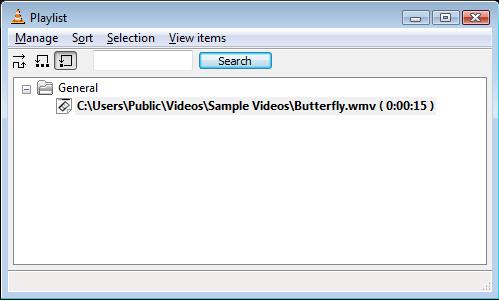
- If you want to play a short file again and again. Click on View menu and select Playlist. In the Playlist dialog, select the file and click on the icon “Repeat one“. Close the Playlist dialog and enjoy!

I forgot to mention that when you run VLC media player in DirectX video output mode, the Aero color scheme will be disabled. The Aero color scheme will be restored once you exit out VLC media player.

… and if you don’t want Aero Glass disabled, try using the OpenGL or Windows GDI outputs, because it’s the conflict with DirectX rendering that forces Vista to turn off its use of it.
But in Vista Premium, when you choose OpenGl or Windows GDI outputs, the Wallpaper option doesn’t work.
Or is it just my computer?
Frost,
It only runs in DirectX mode.
For NON ultimate Vista, DeskScapes 2.0 should work. For Windows XP, you can use XPScene (freeware) from dreamscene.org to run DreamScene videos.
wow, that tip on changing the video output to direct x helped. i now have a wallpaper video player. thanks.
lol, mine has an error, it says I need overlay mode. anyone?
In the video settings, you have to check “Accelerated video output(Overlay)”. This feature might not be available if your video card does not support overlay.
there is dreamscene activator