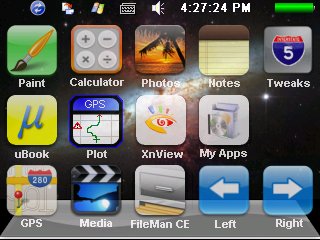
 My original package was designed for Navigon 2100 US model. A lot of people have adapted the package to be used on other Navigon models. There are some reports about my release 4.2 causing some GPSs other than Navigon 2100 to reboot continuously.
If you’re thinking about purchasing a new GPU, we’d greatly appreciate it if you used our Amazon Associate links. The price you pay will be exactly the same, but Amazon provides us with a small commission for each purchase. It’s a simple way to support our site and helps us keep creating useful content for you. Recommended GPUs: RTX 5090, RTX 5080, and RTX 5070. #ad
The cause for this problem is that my script reboots (resets) the GPS after successfully unlocking. The problem is some GPSs’ registry got wiped out clean after each reboot. Therefore, the next time system boots up, the script thinks the unit is not unlocked and does the unlocking again and reboot.
To fix the problem, I have changed the script so it won’t reboot again. I also made some modification for the taskbar to show up correctly. Two packages have been made for this release. The first one is the whole package which is for people who have not downloaded my release 4.2 before. The instructions are the same as the release 4.2. Here is the link to the zip file.
The second package is for people who have download the release 4.2. The second package has only two script files: autorunce.mscr and StartBtn.mscr. Please replace these two files in your old downloaded package. By default, autorunce.mscr goes to the root of the SD card and StartBtn.mscr goes to the Script folder on the SD card. Here is the link to the zip file.
Please consider making a small donation to my site if you find my package useful. Thank you!
I used your unlock 4.2.1 to unlock my 7100 Navigon. I think it’s great but I have a problem. I cannot start the Gps. I’ve tried the icon, opening the renamed auto file and have no luck. The screen flickers a couple of times but Windows doesn’t close nor does the Gps start. Any help would be appreciated. I made a donation for your time. I hope it isn’t too small.
Steve
Steve,
Thanks for you generous donation. I certainly can help you with the problem. First, I’d like to know if you have renamed the original autorunce.exe to autorunec.exe? If you accidentally deleted the autorunce.exe, the GPS program cannot run any more.
Thanks a lot for this fantastic unlock software.I tried it on a navigon 1200 and it runs great.But I have 4 important drawbacks.first at start it doesnt find “taskbar window†so i cant use it.Second when i push “settings†it cant find “control.exe†in windows folder.Third when i push calculator the ppc restarts.And last the tooglekeyboard key doesnt work.I will appreciate any help on these.
Thank you,.
Regarding the control.exe issue, you need to use the FileMan CE to find out the executable file for the control panel of your Navigon 1200. I am not sure about the other 3 problems. Maybe some of the files are corrupted. You can try to copy the files again.
Thanks for the reply.I found some windows ce 5.0 system files and i replace the original in the script folder.Now i have a taskbar but is very simple , i have settings button running ( i found control.exe file) except that it cant recognize system path( i put ctlpnl file but it doesnt find it).So my question is where can i find a taskbar.exe file like windows 98 or ME and how can i define system path to the register whhen the ppc boots.
thank you.
If you want to add a path to the systempath, modify the autorunce.mscr and add this line.
RegWriteMultiString(“HKLM”, “Loader”, “SystemPath”, Array(“your-path”))
where your-path is the path your want. I do not know about the taskbar.exe.
Will this work on other Windows CE devices?
Yes, it’s possible to use this on other Windows CE devices. However, each device has its own executable file to invoke navigation program. You’ll have to find that out.
Will this hack work for Navgon 2100 Max GPS?
With modification, you could use it on any Win CE based GPS. However, I do not have a Navigon 2100 Max, so I cannot tell you exactly how to modify the package to work with your unit.
I used your unlock 4.2.1 to unlock my 2100 Navigon. It seems to be a very good piece of software but I have a problem.
After the unlock all was fine: Navigon started with the GPS-app, different games and other programs I could start and stop. But later, after switched off/on the unit Navigon starts with the splash screen and stops further activities.
I tried some reset, removed the unlock files, renamed the autorunce.exe – nothing happened.
Any help would be welcome.
KaHeMu
I have got some reports of similar problem lately. I wonder if Navigon has done something to the newer GPS units. Anyway, I suspect the hard reset doesn’t actually reset the GPS. You can try to restore the files to your SD card and let the battery drains out completely first before you try again. This might reset the GPS back to factory state.
Thanks for your reply. I’ll try your hint and give a response asap.
Regards,
KaHeMu
During last night, the battery drained out and today there was no energy left. After charging the start up was still the same as last days. I am left clueless.
Regards,
KaHeMu
Have you tried a different SD card?
I’m unlock Navigon 3310 with your sw, but for this model is not fuly funcional.
Path for SD card is not “\Storage Card\” I’m not find real path for now.
Big thanks
I’ve manage to unlock my navigon 1300 but the screen calibration is off. How can I fix this? Unable to go beyond the opening screen
Hi, thanks alot for the information and service you have given us. I have a navig8 588 running windows ce v 5.0 and ive managed to get it working with your software, although its not that tidy. I have one issue im not sure how to resolve, im new to this, i only got my gps today 🙂 Whenever i turn off the unit and boot up again all the changes i have made, shortcuts that sort of thing revert to how they were, the desktop is the same with the previous icons i deleted. I cant seem to get it not to reset when i power off. Some settings stay though, like the startbar auto hiding and the wallpaper. If you have any idea id be very appreciative.
Thanks
I deleted the autorunec.exe file.
Is there a download out there where i can get it back?
thanks
If you have a US navigon 2100, I could upload my copy of autorunec.exe for you.
I have a navigon 7310. I would like to unlock. Can you help me? Thank you!
I do not have a navigon 7310, so I cannot help you. Sorry.
will this work with a navigon 6000t?
hi i wonth to use igo 8 on my navigon 2200 i have downloaded you win ce. perfect.
but im not a progressive user i relly wonth to use igo on my device.
what do i need to change or do?