Just got a chance to install the Windows 8 Developer Preview on VirtualBox today. When I created my virtual machine, I accepted the default settings. I got this error message when I booted up the machine.
If you’re thinking about purchasing a new GPU, we’d greatly appreciate it if you used our Amazon Associate links. The price you pay will be exactly the same, but Amazon provides us with a small commission for each purchase. It’s a simple way to support our site and helps us keep creating useful content for you. Recommended GPUs: RTX 5090, RTX 5080, and RTX 5070. #ad
Status: 0xc0000225
Info: An unexpected error has occurred.

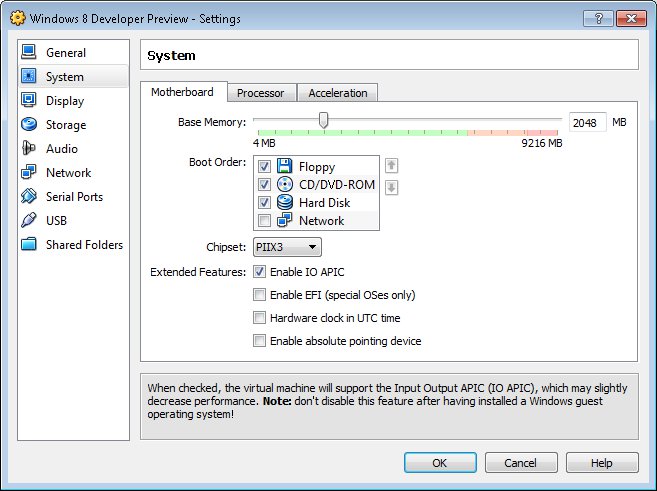
I remembered that my friend told me you have to enable IO APIC on VirtualBox. I enabled it and it worked. To enable that, select the virtual machine you created. Click on the Settings and then System. Check the box that saysEnable IO APIC.
Another tip about running Windows 8 Developer Preview on VirtualBox is that you have to use the Intel Pro Desktop as the network adapter. The default network adapter did not work.
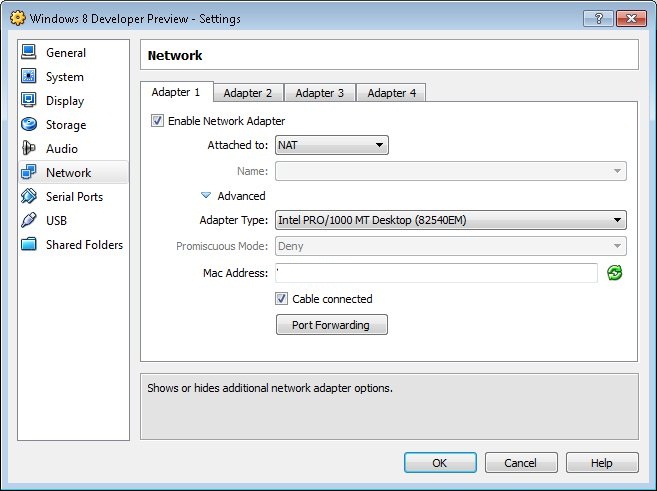
To change it, open up the settings dialog. Click on Network. Click on the triangle next to Advnaced to expand it. Under Adapter Type, select Intel PRO/1000 MT Desktop.
THANK YOU!!! Granted, I only spent a couple minutes searching for this on Google, but, having your site as the #1 site returned for “windows developer preview 0000225” saved me a ton of time. Again, thank you!
thanks this fixed it ^^
Thanks for posting this. It also fixed the same issue we had with Windows 7.
Thank you for taking the time to share this, changing the settings did fix it for me.