How to Unlock Mio C230
Original Release
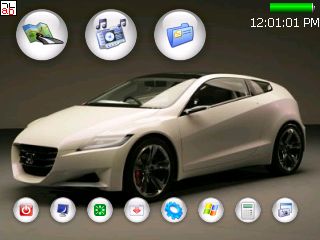
This is the original release that started it all. It is the first unlock guide ever published for Mio C230. The guide has made hacking/unlocking Mio C230 possible and it has inspired other efforts for making Mio C230 a wonderful device to own.
Release 2

In the first release, I did not tweak the desktop at all. The second release is my first attempt to make the desktop more appealing.
Release 3
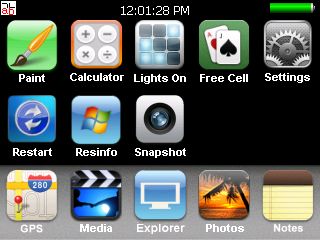
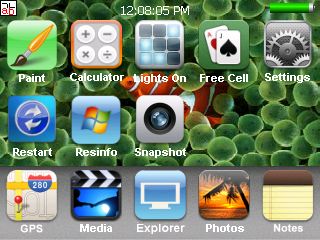
This is the first release based on what I called iMio theme.
People like the look of the desktop very much. A lot of similar desktops are popping up after I published this release.
Release 3.1
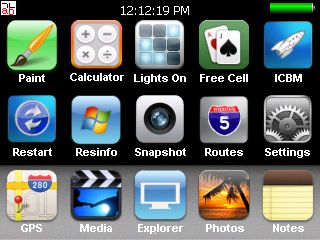
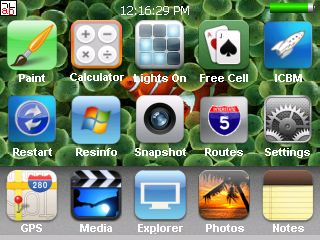
I added the Routes Management to this interim release.
Release 4
[Updated: 3/3/2008]
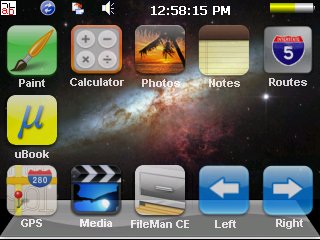
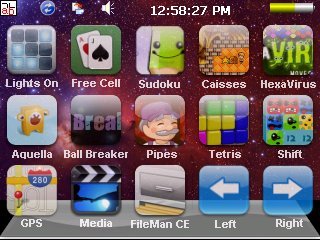
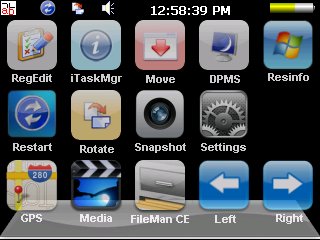
The biggest feature of this release is the SD card based unlock. Thanks to MoonBear, the unlock procedure is the easiest compared to previous releases. With more and more applications added to the package, a single desktop is not enough to hold all the applications. I created these desktops so that it’s easy to switch between different desktops and it’s also easy to add more desktops as needed. The Routes management has also been updated to switch MioMap skins (Mike FFI).
Release 4.1
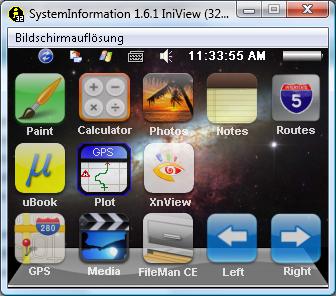
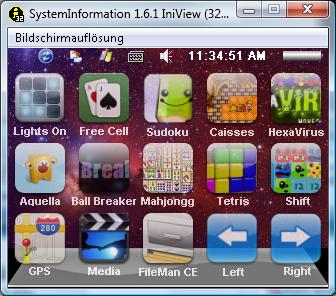
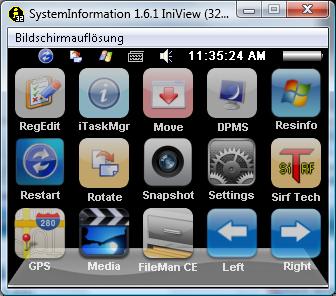
This release includes the following new features:
- Cab files installation
- .Net Compact Framework 3.5
- Increased Storage Memory
- Functional Taskbar
Don’t forget to click on the title of the release to check out the details for each release.
Here is a list of my other articles related to Mio C230
- Updating SpeedCam file for Mio C230
- Adding Custom POIs to Mio C230
- Adding Canada Map to Mio C230
- MioMap 3.3 Skins for Mio C230 (split screen!)
- MioMap 3.3 DATA.ZIP Tweaks
- Running ScummVM on Mio C230
- Requesting 12M POIs Maps for Mio C230
- Tweaking SYS.TXT for MioMap 3.3
- Wishlist for Unlocking Mio C230
- Accessories for Mio C230
- Getting Programs for Mio C230
- Increasing Storage Memory for Mio C230
- Programs for PNA
An important note about unlicensed maps: The use of unlicensed maps is illegal. Please don’t ask where can you get maps not licensed for your device or how can you get MioMap to recognize the unlicensed maps. Any question regarding unlicensed maps will either be deleted or ignored.
If you like my articles, please consider a small donation. Thanks!
Find deals on Amazon.com
Mio C230 Mio GPS
Garmin GPS
TomTom GPS
GPS and Navigation


on October 31st, 2007 at 8:32 pm
I’ve been Googling “c230 hack” everyday waiting for someone to create what you’ve come up with today! EXCELLENT WORK. Your instructions are great and worked great - much simplifed from the unlock instructions for the C220. For those of us that have never played with other GPS units though, nor the Mio c220, if you could expound on your programs in the Scripts folder, a little (making your site a one-stop shop), I would be happy to donate to your site.
I would like to know more about the intricasies(sp?) of the programs like BananaPC, such as what are the 2 functions next to X (close)? I am assumming your MioMap icon links to the MioMap execute in the MioMap2 folder. Why is there a sleep icon and a power button icon? they both seem to do the same thing. What is the icon above the power button (Mov…) do?
Again, I’m not complaining; I finally can play now. I just feel that an expansion of your efforts will make YOU the C230 Hack King that folks would gladly donate to if they don’t have to go to GPSpassion to try and get clues as to using the other little programs. By the way the clock on the main screen seems to show the GMT date, which tonite is one day ahead of mine, rather than the day shown in clock settings.
on October 31st, 2007 at 10:18 pm
C230,
The post is just the first step. I tried very hard to get a working system that I can use without hard reset the system frequently. The next step would be to fine tune the desktop and install additional programs. The sleep icon and power button icon are redundant. I’ll get rid of one in the next release.
The MioMap icon links to a script in the Script folder. The script does some processing and invoke MioMap.exe in the MioMap2 folder. It also reboots the machine when you exit out MioMap.exe
If you are interested in BananaPC, you can visit this site.
http://www.snoopsoft.com/other/bananapc.html
I noticed the time and date are not always correct. I’ll look into it.
on November 1st, 2007 at 10:21 am
thankkkkkkkkk youuuuuuuuuuu
you are simply the……BEST.
PLEASE ….I WANT TO LOAD MAP OF GREECE AND EUROPE.
IHAVE THESE MAPS BUT I DONT KNOW HOW DO I DO.
THNKSSSSSSSSSS
LIOLTGO
on November 1st, 2007 at 1:30 pm
Lioltgo,
I have not tried that, so I don’t know how to do it. If you know a public and free map that I can download, I can try it on my Mio. If you are talking about pirated maps, then I cannot help you.
on November 1st, 2007 at 1:32 pm
Amida,
I’ll do what I can to help you refine the package.
Regarding the Greece map, what I did to load a Canada map is to erase an unused U.S. state map file (California.fbl in my case) from the Map subfolder (since you can copy back in later from your DVD, and copy Canada.fbl in it’s place. Link to version 2007.1 file is ; I picked the smaller file with 3 million POIs, rather than the larger file. There probably is a way to copy to SD disk instead, but I don’t have one yet.
on November 1st, 2007 at 1:50 pm
C230,
I found that the power button icon and the sleep icon are not the same. The power button icon puts the system to sleep, while the sleep icon only turns off the display.
on November 1st, 2007 at 2:48 pm
c230.
mission finished!!!!!!!!
i loaded destinator for pna.
if somebody wants the..know-how my pleasure to help
thank you for unlock
lioltgo(george)
on November 1st, 2007 at 11:16 pm
the date is correct , just not here. I removed the callout for date.ini and changed time.ini so that it is a AM/PM clock by changing x=30, width=75 and changing the format string to read: Format = hh’:'mm’:’ss tt
Also, the gpsCalculator works in the C230
on November 3rd, 2007 at 10:51 am
check out my blog for more:
on November 3rd, 2007 at 10:52 am
http://c230.wordpress.com/category/c230/
on November 3rd, 2007 at 4:00 pm
C230,
Do you know how to get the taskbar to work? I already load it at the startup. However, it works intermittently. I am hoping to use it consistently.
on November 3rd, 2007 at 7:06 pm
Not sure what you mean. Do you mean why doesn’t the Mio show up on the taskbar of the PC connected to the Mio? It never shows up for me anymore, nor was I ever able to install the USB driver; I’m thinking this is related to the USB cable I am using. I’m using a USB ver 1 cable (5-pin) which will charge the Mio and allows me to see the flash drive and the storage card as “Devices with Removable Storage” in My Computer. I am not able to see the Mio’s Windows directory though. Perhaps your USB cable is not a reliable version 2 cable.
The first USB cable I used was a cheap retractable type and all it would do is charge the Mio; nothing else.
on November 3rd, 2007 at 10:14 pm
C230,
No, it’s not what I meant. Taskbar is an application that provides a Windows XP like taskbar on the bottom of the desktop. You can check out this page for a picture.
http://www.instructables.com/id/E23CK0OCDDEXCFIQM9/
It’s already running when you use my hack. However, I couldn’t get it to show up consistently.
on November 4th, 2007 at 2:59 pm
I fooled around for a couple of hours playing around with the border parameter in fondo.ini and the Autohide parameter in script.mscr and actually did get to see the taskbar once, but as you stated, it didn’t remain after the next power-up.
on November 7th, 2007 at 5:10 pm
How much RAM and Flash Memory is on C230?
on November 7th, 2007 at 5:35 pm
C230 has 64MB of RAM and the internal Flash Memory is 1 GB.
on November 7th, 2007 at 6:45 pm
Amida,
Would you like to use my package as R2, or are you already refining further? Any luck with the taskbar repeatability? I think it might be better leaving it alone in that users of the 220 / 250 unlock complained that the taskbar wouldn’t hide itself properly when using MioMap.
on November 8th, 2007 at 10:44 am
C230,
I have been busy recently. It will be a while before I release it again. There is a utility called “ShowTaskbar”. It’s by the same programmer who wrote SystemInformation. You can find it here.
http://gpstacho.bettersoft.de/index.html
Click on “Nützliche Tools” to get to the download page. However, the utility just brings Taskbar to the front. It can not unhide the toolbar. If the autohide is set, taskbar is still hidden. I still have problems getting the taskbar to unhide.
on November 8th, 2007 at 5:59 pm
Thanks Amida. Another queston is why C230 has TTS but C320 does not. Is that just because of software?
on November 8th, 2007 at 10:38 pm
Cirrus2,
You are welcome. I don’t know why C320 doesn’t have TTS. My guess is that it’s an earlier model. Maybe you can hack it to do TTS, but I don’t have a C320 to try.
on November 8th, 2007 at 11:05 pm
C230 has only been available for about 4 weeks - it is the successor to the C220 with TTS, MioMap 3.3 and a brighter backlit screen. I’ve been very pleased with it, including the stability of the software, especially compared to the Nextar X3T which was my first GPS (for about 2 days).
on November 11th, 2007 at 4:34 pm
Amida,
I read somewhere that Fondo shifts the desktop over to get the icon backgrounds to fill in better. Thinking that the toolbar is formatted for 320 wide, I changed x=320 in fondo.ini to x=0 and the taskbar be much more reliable now, although once in awhile I’ll see it on Mio’s initial orange screen, yet not in the desktop. Running control panel seems to activate it in those circumstances. See what you think.
I’ve spent a few hours and updated your package some more by updating time zone registry settings so that the 2007 changes for DST work right now, the default time zone is GMT-5 (EST), the date works right now, key clicks and screen tap sounds are automatic, File Manager font is Tahoma 7, and instead of having to find autopatcher with the file manager after a hard reset - I came up with a menu that presents you with:
□ Unlocked C230 Desktop which automatically runs AUTOPATCHER and presents you with the C230 desktop pictured above. When choosing MioMap from the desktop, you will be able to return to the desktop using Amida’s BananaPC option.
□ GPS Only (MioMap 3.3) which goes right into MioMap directly as your unit does automatically as shipped from the factory. You will not have the BananaPC option of exiting MioMap – if you wish to do so you will need to do a hard reset.
Maybe I should figure out a way to post the download…
on November 12th, 2007 at 10:00 pm
Amida,
After spending hours trying to getting the Taskbar to appear on demand*, I’ve stumbled on a method that seems to work consistently, atleast in conjunction with all of the other tweaks I’ve added to your R1 build. It seems that running Windows Explorer from File Manager (you will find it in \Windows\Programs) not only fixes the icon associations in File Manager, but it resolves the “Unable to find taskbar window” that so frequently appeared and voila - a hidden taskbar pops into view. I tried adding “Windows Explorer.lnk” to “Windows\Startup”, but that doesn’t seem to take.
Using a stylus to unhide the taskbar and selecting “Desktop” using the last button on the taskbar - you’re good to go!
on November 13th, 2007 at 11:26 am
C230,
You have done a great job on tweaking the unit. Why don’t you just go ahead and post it. You can post your package at http://www.mediafire.com . It’s very easy to register and it’s free.
on November 13th, 2007 at 8:36 pm
C230,
Do you need this unlock to get Canada map to work? How much empty space are there?
Thanks
on November 14th, 2007 at 11:48 am
how to unlock my mio c320 ???
on November 14th, 2007 at 1:17 pm
The Canada map addition to MioMap works independent of the unlock which lets you access other functions on your unit.
on November 15th, 2007 at 10:26 pm
Sv7jar,
I don’t know how to unlock C320. Have you tried my C230 hack on it? Before I read something about it’s not possible to hack C230, but I proved that it’s not true.
on November 15th, 2007 at 10:38 pm
amida,
it seems there is no wceload in the C230 which is needed for installing cab files. do you know of an alternative?
on November 15th, 2007 at 10:45 pm
C230,
I don’t know any alternative to wceload. I usually try to extract the cab files by myself. My release 2 is about ready. I will work on possibly activesync and application install next.
on November 15th, 2007 at 10:56 pm
I tried cabinstl, but it didn’t quite work.
I’ve come up with the registry change needed for activesync, but haven’t been brave enough to try it:
#<>Do not uncomment the following line unless you want to change the USB connection from Mass Storage Class to ActiveSync Serial
#RegWriteString (”HKLM” , “Drivers\USB\FunctionDrivers” , “DefaultClientDriver” , “Serial_Class”)
on November 16th, 2007 at 9:42 am
I had the registry hack before release 1. However, it didn’t work.
on November 23rd, 2007 at 5:12 pm
don’t know if i missed this, but do you follow the same instructions to unlock the c220, or do you have to download another script or something? thanks.
on November 23rd, 2007 at 9:11 pm
Otacon88,
The script is different from the original script to unlock c220. That’s the main reason for the post. You can also check out the new instructions.
How to Unlock Mio C230 Release 2
on November 27th, 2007 at 11:21 am
wow, great job guys!
Is it possible to load different voices using this ?
on November 27th, 2007 at 1:24 pm
Jander123,
This hack has nothing to do with loading different voices.
on November 30th, 2007 at 10:08 pm
Hi Lioltgo
Could you help me to load destinator?
TKS
Tomodati
on December 3rd, 2007 at 1:18 pm
Howdy,
you did a fine job. Nice little car, but is there a way to use a different pic for “wallpaper”?
I just got this little thing and your modifications make it much more valuable.
Thanks,
Mark
on December 3rd, 2007 at 1:23 pm
Cctxxx,
If you want to change the background image of the hacked c230, just create a 320×240 bitmap image of your choice. Name it back.bmp and replace the one in the F:\Script directory.
on December 4th, 2007 at 5:22 pm
Hello,
I was able to get iGuidance v4 to work with c230. I installed my licensed copy of iNav iGuidance v4 on my WM5 (Acer n300) first. Then I copied the folder from my WM5 storage card to the root directory of the c230 card. I found the four DLL from gpspassion.com and placed them in the same folder as iGuidance. I have not tested all the features, but general navigation seems to work without any problems. COM port needs to be set to COM2. Could anyone help add a shortcut button to iGuidance on the main screen?
There are two issues:
(1) The Menubar (File/Tools/View/etc…) covers part of the current street name and stats (time/remaining/distance/mph) when car is not in motion. It auto hides when car is moving. Anyone know how to correct this?
(2) Sometimes when launching iGuidance, it does not do anything. You have to reset the c230 and relaunch.
on December 4th, 2007 at 5:42 pm
Thomatran,
I would suggest you try out release 2. It’s more stable and it’s easier to modify. When you use release 2, all you need to do to add a button to the desktop is by editing the main.ini in the Script folder. For your first issue, are you referring to taskbar, the one like the Windows taskbar with a start button? If you use release 2, taskbar is not invoked by default.
on December 5th, 2007 at 3:24 pm
TOMODATI
[link deleted]
EXTRACT
YOU WILL SEE TWO FILES
1.MOBILE NAVIGATOR
2.X-ROAD.
PUT THESE IN A SD .
on December 6th, 2007 at 10:11 am
Lioltgo,
That file needs a password to extract.
on December 6th, 2007 at 12:49 pm
AMIDA 168 HI.
PASS: kokos2003
on December 6th, 2007 at 11:44 pm
Lioltgo,
kokos2003 isn’t correct. it doesn’t work.
on December 7th, 2007 at 5:44 am
try with pass platano
on December 7th, 2007 at 11:10 am
lioltgo,
The download you provided is commercial software. We would like to know how you made it to load Destinator on Mio. However, this blog doesn’t support unlicensed software. The link will be deleted. Thanks.
on December 8th, 2007 at 9:13 am
TOMODATI.
WHEN YOU RUN THE INSTRUCTIONS MUST TO FIND ”DESTINATOR dll”.
open this and you must change port from 5 to 2 .it is very important.
i hope to help you
george
on December 10th, 2007 at 4:24 am
hi,
For c230&Amida u guys rock!!. It would have taken me forever to do this. thank you! I have question for Thomastran: I have done exactly what you did with a axim51v, but i cant run ig4. I tried igqvga and vga but says cant find igqvga.exe components missing. have 4 dlls, placed inav\iguidence in both storagecard and flashdisk at root. any suggestions? (sorry abbreviated all:)the findgps works though???
thxagainfor all the work guys(love my mio230(except it being off by about 50yds)
on December 10th, 2007 at 1:47 pm
thomastran
i forgot to add structure of folders: storagecard\inav iguidance\4 dlls etc. as a test i also copied from my axim to root of mio in \flashdisk\inav\iguidance and still can not get to run. I have tried both the iguidanceqvga.exe and iguidancevga.exe. any suggestions anyone?
on December 10th, 2007 at 3:52 pm
Stiffbeta,
Storage Card\iNav iGuidance [(contents from YOUR Axim) + 4 dlls] also MAPS
I did NOT install on the flashdisk (do not know if it makes a difference). I had to reset the unit a FEW times for it to work–trying to launch after each consecutive resets. I am not sure why that is. As far as the menubar issue covering part of the information on the screen, that can be resolved by FIRST rotating the screens several times before executing iguidanceqvga.exe–I am using v2 of the hack by-the-way.
Hope it works out for you. Did you get the correct DLLs?
on December 10th, 2007 at 7:36 pm
thomastran,
thanks for your help. Thats pretty much how I have mine. When launch iguidance i get error about iguidanceqvga not found(components not found/missing) did you get this thus the resets? I also got all dlls from gpspassion. would it be possible to send me your 4 dlls(all public thus legal) to a-r-t-r-u-f-f at gmail.com (no dash’s:))? thx though for your help, if cant get this then will try igo
no tts-bummer.
on December 12th, 2007 at 5:10 pm
Thomastran:
I just got a c230s (Canadian version of c230). It comes with detail Canada and major routs of US. Is there any way to inclue a detail US map and where can I find a detail US map.
Thanks
on December 15th, 2007 at 1:25 pm
Newbie question - I have the US version of the Mio C230 with MioMap 3.3 and I’m trying to add a new color scheme.
I connected the MIO to my computer with USB.
I then copied one of the existing scheme zip files and changed some of the values in the COLOR.INI file.
Finally I placed the new zip file in the same folder as the other schemes.
When I use the menu to change schemes, the new scheme doesn’t appear in the list.
I have not unlocked or otherwise modified my Mio. Any ideas what I’m missing?
on December 17th, 2007 at 1:48 am
Hi ,
Is there any link where I can find the Canada maps?
Vivek
on December 17th, 2007 at 10:27 am
Charltonc,
Where did you get the color scheme? Are you sure it’s for MioMap 3.3?
on December 17th, 2007 at 10:28 am
Viveksundarrajan,
http://uploaded.to/?id=fog23c
on December 19th, 2007 at 7:46 pm
Amida, I’m sure it is for MioMap 3.3 since I copied it directly from the C230. It is one of the schemes currently available to the device.
on December 20th, 2007 at 9:49 am
Chartltonc,
Maybe you have some values in color.ini that C230 doesn’t like.
on December 21st, 2007 at 9:40 pm
[...] a hard reset to see what they are working with. This is what enabled Amida168 to develop the original C230 unlock last [...]
on December 22nd, 2007 at 11:32 pm
I hacked my Mio C320 and got the TCMPM to play .mpg (MPEG2) video very jerky though-audio perfect. I loaded and installed (by tapping to run the install). TCMPM Settings are:
Speed=100%;
Video/Zoom=”Stretch to screen”;
video/pixel aspect ratio=4:3 screen;
video/orientation=right-handed
I really wish I could find a way to view .wmv videos but it seems there is no codec for it out there. Does anyone know of one???
on December 24th, 2007 at 1:20 am
Amida,
Thanks.. but the link you have sent has a problem. Every time I try to download it never get the 110MB file,it downloads only a 80-100kb file. Is there a problem in the link or am i doing something wrong?
Vivek
on December 24th, 2007 at 10:17 am
Vivek,
I just tried to download it again and I have no problem with it. You can try the other link in this post.
link
on December 26th, 2007 at 6:53 pm
Hi Amida168, thanks for your help.
I realize you are on “release 3″ now, but I thought I’d continue my question in this thread…
In attempting to make a new color scheme, I have copied one of the existing ones from the C230. The only thing I’ve changed has been the name of the zip file and the value of the “name” parameter in the Color.ini file itself - I’ve changed no other setting (so I assume the color.ini values are valid). After copying the new Zip file onto the device (in the same place as the other color scheme zip files) and resetting it, the C230 does not show the new scheme as a choice. I have not attempted to “unlock” or otherwise change the C230 - just copied this one file. Any ideas why it won’t show up?
on December 26th, 2007 at 7:19 pm
Charltonc,
Try using the same name for the zip file.
on December 27th, 2007 at 2:28 pm
Hi Amida,
Thanks.. was able to download it.
Vivek
on December 30th, 2007 at 10:00 pm
I’m still using your Release 2 (with some customization). What are the files I need to play H.264 AAC? I saw that you incorporated the plugin for the Core Player in R3, but I’m not certain which files they are. Please help.
Thanks you!
on December 30th, 2007 at 10:26 pm
Thomastran,
link
on January 1st, 2008 at 1:09 pm
Hi Amida,
I was seeing your iphone look desktop version, can you share the link where you have uploaded the same version
thanks vivek
on January 1st, 2008 at 3:34 pm
Vivek,
Please look for the link “How to Unlock Mio C230 Release 3″ in the Top Posts on the right.
on January 4th, 2008 at 1:40 pm
This post is dated and I am closing the comments section. Please go to
http://kombitz.com/category/mio-c230/
and look for the latest release.