Adding Custom POIs to Mio C230
I always thought POI Explorer is the only way to add custom POIs to Mio C230. I just found out a feature of C230. Adding custom POIs is so easy.
- Find the POI set from the sites like POIfriend.com .
- Download the POI set in Google Earth format (kml).
- Create a folder called POI in the storage card.
- Copy the kml file to the POI directory.
That’s it. No lengthy conversion is needed.
[Update: 11/29/2007]
I just tried the other Google Earth format (kmz), and it works too. The kmz is a zip file of kml. The file size is much smaller, 3 KB vs 37 KB for a 10 POIs file. You can use Google Earth to manage your POIs.
[Update: 11/30/2007]
My reader reported that after adding custom POIs, the machine becomes sluggish. I also noticed that myself. So far, I only added 1564 Target POIs and when I type something in the POI search screen, there is a slight delay.
I decided to give POI Explorer a try. The internal custom POI file is called iGo.db in the MioMap folder (or MioMap2 if you use my hack). You can use POI Explorer to import from and export to this file. When I am done importing the Target POIs, I then exported the POIs to the original iGo.db. The exporting took a long time, about 20 minutes on my Acer Ferrari 3400. The original iGo.db file is 70KB. It’s now 392 KB after I added the additional 1564 POIs.
After so much trouble, you would think the performance would be better, right? Unfortunately, I didn’t notice any improvement over the previous method. Actually, the startup takes a longer time to load. I think I am going to stick to the straight kml or kmz download for now and load only the POIs I really need.
[Update: 12/21/2007]
A reader has asked for a quick run down for POI Explorer. Note that I found that POI Explorer is very buggy and it crashes a lot. I don’t recommend that you go this route. Anyway, here are the steps:
- Download and install POI Explorer.
- Turn on your Mio C230 and connect it to the computer using a USB cable.
- Mio C230 shows up as F: drive.
- Have your iGo.db file ready. It’s in F:\MioMap\MioMap\ or F:\MioMap\MioMap2 if you have unlocked it. Make a copy first, just in case something goes wrong.
- Run POI Explorer and click on File -> Import -> From iGo database from file (offline)… and select the iGo.db file from your unit.
- On POI Explorer, click on File -> Import -> POI from file… and select your downloaded POI file in csv format. Note that I tried kml files but POI Explorer crashed.
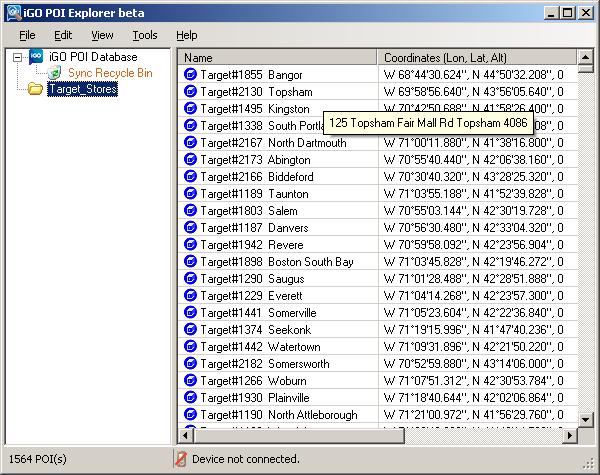
- (Optional) If you want to change the icons, you can do so by first selecting the POIs and right click and you can change icon. However, the icons are limited to the default icons. I don’t think you can use other icons.
- Click and select the folder and drag it under “iGO POI Database”.
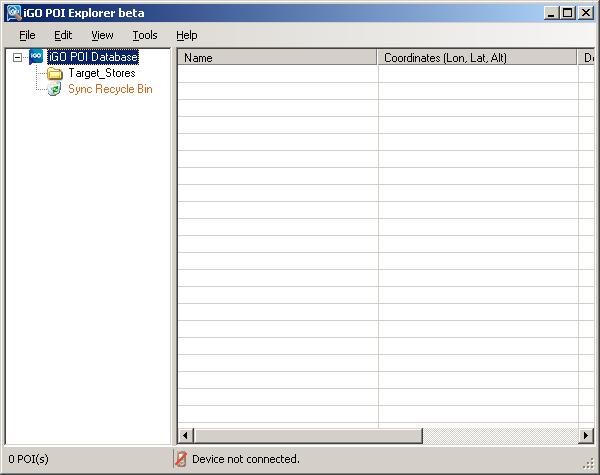
- Repeat the steps 6 to 8 for all the POI files you downloaded.
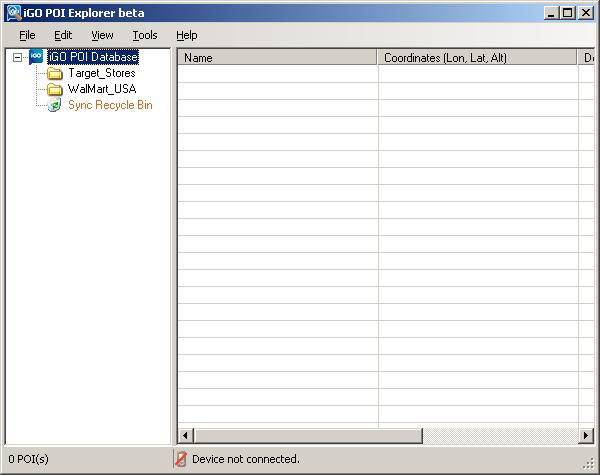
- Click on File -> Export -> iGo database to file (offline)… and select the iGo.db file in step 4 or a backup of the iGo.db file. Note that this step takes a long long time. You might want to do something else in the mean time (like donating to this site
). - When the process is done. Copy the iGo.db back to the original folder.
[Update: 2/5/2008]
A reader has provided a link to request map files of more POIs.


on November 29th, 2007 at 6:33 pm
I am about to get a c320 so I can’t wait to try your hacks. I wanted to clarify that the Google Earth kmz file is just a normal zipped file with the extension kmz instead of zip. I plan on using this to feature to enter all my friend’s addresses.
on November 29th, 2007 at 7:28 pm
Orion523,
Thanks for your input. I figured it’s a compressed file format, but I didn’t know it’s just zip.
on November 29th, 2007 at 8:10 pm
Hi, what is the path on the storage card for the PIO folder? I put some POIs in kml format on mine, but still don’t see them when running the C230?
on November 29th, 2007 at 9:26 pm
If your storage card is assigned a letter G, the folder is just G:\POI . Note that it’s POI not PIO as in your comment.
on November 30th, 2007 at 12:48 am
amida168,
does adding these POI’s to the memory card slow down the start-up and POI search significantly? so far, i’ve found that it increases start time by 30-1min (it’ll say STARTING), which is really no problem. but when I try to do a search on the POI name (like starbucks), it hangs for 15+ seconds on every letter before i can enter the next letter. so it take me minutes to enter starbucks.
is this your experience also? is there no way to use a POI directory on the internal flash to make it search faster???
thanks! hdfan
on November 30th, 2007 at 3:28 am
amida168,
Hey well spotted, I must have had a brain freeze as I did in fact put PIO as a folder not POI…thanks!
on November 30th, 2007 at 8:08 am
hdfan,
How many POIs have you added? I have 1564 Target store POIs and I didn’t notice any startup lag. I did notice that searching POIs is kinda slow, but it only hangs about 1 or 2 seconds for me. I’ll try other ways to add POIs.
on November 30th, 2007 at 4:32 pm
hdfan,
I tried POI Explorer. Please see the update dated 11/30/2007.
on November 30th, 2007 at 5:58 pm
I also loaded new POIS to my mio c230 last night but I used MIOs POI Loader tool from their web site - they show a way to add new POI categories as well to file your POIs in. But alas, It also causes a lag when searching ALL or in the new My POIs categories. If anyone can figure out how to hack them into the actual internal db then there should not be a lag - for instance add them to the already existing Category - such as Shopping…- by the way waht gives with that - it doesnt even include Walmart or Krogers…only ’shopping centers’ in general! weird….. What is nice - I found - is that once you add POIs from an SD card - you can remove the SD card and still have the POIS (as long as you dont hard reset without the card in). I have not hacked mine yet, so I dont know how that effects it, but it appears the MIO does bring the additional POIS into its internal storage someway. Maybe its just cause they are not indexed that search is slow. I mean if the MIO has 1 million in it already, and you add even 10,000, that should not suddenly slow it down because of too many…it is the fact they are being added in a different way than the original POIs that slows it. Also I’d like an easy way to change or add icons for the POIs. When I drive by a starbucks I want to see the green circle! And finally, on the hacked MIO - can you install anything that can run on windows CE? Like a calendar/organizer? or games?
on November 30th, 2007 at 10:31 pm
one more thing here is the link to the mio poi loader tool and instructions
http://www.mio-tech.be/en/mio-club/poi-loader.php
I think you have to make an account to get there
Also I just found my MIO freezes when it calculates a route now that I have added custom POIs wiht this tool, today I had to remove the custom POIs. Like I said abive, I do not have mine hacked yet, havent tried it, so its not that, the only thing I have done is add POIs on an SD card - and I also tried both a regualr SD and a 150x SD - that is not HiSpeed SD - since HS do not work at all I hear - and 150x SD does not make the POI search any faster. I have 3 different types of SD cards, I am going to try each one tongiht and see if they all freeze the MIO….
on November 30th, 2007 at 11:05 pm
Ok I did the tests, all the cards cause the freeze and the search for POI delay… after testing all my SD cards I confirmed the MIO can still use POIS after you take the SD card out, it can still route to the POIs after you take the SD card out, but it is VERY slow to route wether the SD is still in or not…and it will sometimes freeze at 100% done but not show the route - if I pop the SD card out it shows the route and unfreezes, and this was even on routing to preloaded POI (not the cusotm ones I added). I think what is happening is it has to load all the custom POIS ‘onto’ the route you make so you’ll see them as you drive (I have them turned ON)….now I will test with out any custom POIs loaded at all, I bet it will all be fast again…to do this I remove the SD card and hard restart (with switch on back)….yes it definitely creates the route faster without any custom POIs loaded. That really bites….it makes me not wanna load any custom POIs…I am thinking of returning my unit to see if another GPS does not have such a lag time for custom POIs due to this issue…. I have 25 more days to make my decision to return it within the 30 day return period at radio shack..too bad it’s such a new unit and no one has found a fix for this yet….
I bet if a fix could be found to add the pOIs into the systems original POI databse then this would not occur.
What about playing MP#s and videos - do you see a lag or any freezing when reading from the SD card on your hacked unit?
on November 30th, 2007 at 11:06 pm
Tcady,
From what I have read, using the POI loader is the same as adding kml file to the POI folder on the storage card. There are 3 different sources of POIs.
1. The original POIs which are embedded in the map files. It cannot be changed unless you change the map file.
2. User defined POIs which are stored in iGo.db file in MioMap directory. You can manipulate these POIs using the MioMap interface or POI Explorer.
3. Second set of user defined POIs which are stored in POI directory on the storage card. You can use Google Map or POI Loader to manage them.
I have played around for the second and third sources. Unfortunately, adding more POIs to these two sources seems to hurt the performance of MioMap. Note that the second source is on the internal flash disk already, but adding POIs here also causes a lag. Therefore, I don’t think using a high speed card would help much.
Regarding the unlocked Mio C230, you can run some Windows CE applications on it. However, C230 is a stripped down Windows CE, there are a lot of dlls not included. I have tried to run several different applications on it. However, a lot of them do not run because of missing dlls. I know that it can play a lot of different kinds of media files and it can be used to show photos. You can also play some games.
on November 30th, 2007 at 11:27 pm
Tcady,
Thanks for your great input. I am just curious, how many POIs did you add? I only add about 1600 POIs. There are some lags, but it doesn’t freeze on me. I used to own a Garmin C320. I didn’t notice significant lags after adding POIs. But, then again, I didn’t add a lot of POIs to begin with.
When I played AVI video files on my hacked unit, I didn’t notice any lags. There are some lags when you play H.264 encoded files, though.
on December 1st, 2007 at 4:17 am
Thanks Amida168 and Tcady for confirming the lags. When I read you could add POI’s I put all the ones in the SD POI directory that I thought I might want (Walmart, Starbucks, Target, Circuit City, etc). So I probably added quite a few POI’s there.
It’s unfortunate that MIO both stripped the built-in POI database AND made it effectively impractical to add your own database (of meaningful size) of POIs. Most of the reviews you see really like the unit but consistently knock the limited POI database.
And great job overall on the hacks Amida168! It’s always great to get the most you can out of your device, even if the manufacturer didn’t intend it that way!
BTW, on the topic of missing DLL’s, these can’t be added manually from another device that uses CE?
on December 1st, 2007 at 8:52 am
I probably added 10000 POIs by SD card. The starbucks list alone was 7500- I get lists in csv format first, then I opened them in Excel and removed every POI except the SE states of TX, LA, MI, AL, FL since my brother lives in FL and I thought it would be nice to have them incase I drive there this summer. I have added only ten or so POIS to the internal “Enter your own POI” function and did not notice a lag from it. I am going to reduce the POI lists to 100 or so each, just Houston, area - and see if it effects the lag.
on December 2nd, 2007 at 11:51 am
ok, I finally got the guts to hack my mio c230 - i’d never hacked any device before and was worried about bricking it - but it was SO easy, and I love it now!
Still a delay on SD added POIs but I think I can get used to it, you just have to t y p e r e a l s l o w…LOL
I love being able to have pics an vids of my baby to show people!
Please write instructions on how to create your own backgroup bmp, size etc…
on December 2nd, 2007 at 12:33 pm
How do I tell which version of MioMap I have on my C230? I want to do things they talk about here
http://www.gpspassion.com/forumsen/topic.asp?TOPIC_ID=70131
can I use skins, or add the customization one person made which makes the flyover happen faster?
on December 2nd, 2007 at 7:50 pm
I tried a simple experiment today on POI’s. Last time I used a 512MB card, which I thought perhaps the Mio had to “sort thru” each time to find the POI directory, etc. So I used the smallest SD card I had (16MB) and tried it again. Instead of a 20-30s pause between letters, it was more like 5s or so.
So it was better than the first time, but I also had another variable that may also account for it. The first time with the 512MB card, I had more POI’s in the POI directory. This time, I only had Starbucks. So smaller SD card and fewer POI’s, so either could have accounted for the much shorter delay times.
I didn’t take the experiment any further, because even 5s between letters is too long for me, so as far as I’m concerned at this point, adding POI’s via SD card is a no-go for me. Hopefully someone finds a way to hack the C230 to enable POI’s to be inserted (somehow!) on the internal flash.
Tcady, the Miomap version is 3.3 according to the what the device displays. Does that help? Look forward to any updates on your side about further customizations. . .and faster flyover would actually make that feature usable!
on December 2nd, 2007 at 8:57 pm
Hdfan,
in my blog at c230.wordpress.com (near the bottom), I discuss how to move seldom used maps from the flash drive to the SD card with no noticeable difference in performance. By doing this you could free up alot of room on your flash drive for POIs. Let us know.
on December 2nd, 2007 at 10:35 pm
hdfan,
Yes, I suppose you can add those missing DLLs manually. However, I don’t have access to a Windows CE 5.0 device, so I have to search for the DLLs online.
By using POI Explorer, you can add POIs to the iGo.db file which is on the internal flash. I didn’t notice any performance improvement, though.
on December 2nd, 2007 at 10:42 pm
tcady,
C230 has MioMap v3.3. Those skin exchanges are exclusively for v3.2. They might work partially, but I am not sure.
If you want to change the background image of the hacked c230, just create a 320×240 bitmap image of your choice. Name it back.bmp and replace the one in the F:\Script directory.
on December 4th, 2007 at 1:46 am
Amida,
When you say you didn’t notice any performance improvement by adding POIs to the iGo.db file using POI Explorer, do you mean any improvement over adding POI’s to POI directory on SD card?
I haven’t tried to add POI’s using POI Explorer, so I don’t know if it’s a manual thing or you can add 100’s/1000’s of them easily.
Basically, I’m looking for any way to efficiently add 1000’s of new POIs to the unit without degrading performance. It doesn’t seem like there’s an identified way to do this though, right?
Thanks.
on December 4th, 2007 at 10:04 am
Yes
It’s a manual process. It’s fairly easy. It’s just that the exporting takes quite a long time.
That’s correct.
on December 4th, 2007 at 10:58 pm
I just put the kml file on my SD card with the foler name POI. But when I start the GPS, nothing happend in POI. Do I need hard reset or hack it before add the new POI? Thanks
on December 5th, 2007 at 8:08 am
Wxw160,
You don’t have to do a hard reset or hack it to add the new POI. It’s possible that the SD card is not compatible. You can try another card. Also, is your unit a C230 or some new models? This is only for newer models.
on December 12th, 2007 at 10:45 am
I followed tcady advise and loaded TAREGET/WALMART/STARBUCKS/DUNKIN DONUTS POIs into my mio C230. It was difinitely slow in starting after I hard reset it. But then it was fast it searching the POIs I wanted. It did not freeze. I loaded into separate folders.
on December 12th, 2007 at 11:01 am
MioC230User,
Thanks for your input. Do you mean have a folder for Target and a foler fro Walmart,…? That’s interesting. Initially, I put everything in one folder. Maybe put them in a separate folder would help the performance.
on December 14th, 2007 at 11:44 am
Amida168,
Yes, I had separate folders for each of them. Initially I had put them all in one folder, it took a long time to search. So I separated them into folders and the performance improved.
on December 16th, 2007 at 5:13 pm
Are the folders on the SD card or on the flash memory of the unit?
on December 16th, 2007 at 8:46 pm
MioC230User,
Like Wild1961 I’d be very interested in some clarification.
Did you create a POI directory on the SD card, and then have subfolders called Target, Walmart, etc? If so can the subs have subs?
Just ordered a SD card so can’t experiment yet.
Thanks.
on December 17th, 2007 at 10:50 am
MioC230User is talking about using POI Loader Tool from Mio Tech.
http://www.mio-tech.org/en/mio-club/poi-loader.php
on December 17th, 2007 at 12:54 pm
I am having trouble with the suggestion made by mioc230user. I created seperate folders for each poi. For example my path was E:\poi with a folder called starbucks and another called wall-mart. Loaded my poi’s into each like normal, but could not locate either when using the the c230? When they are both located within the poi folder I can access them with the c230. Am I doing something wrong.
on December 17th, 2007 at 1:01 pm
Samson29,
You need to use POI Loader Tool.
http://www.mio-tech.org/en/mio-club/poi-loader.php
on December 17th, 2007 at 8:10 pm
Thats what I did. Didnt work. Sounds stupid but could you please clarify the steps. I opened the poi loader. Selected the drive that contained the card. I then selected the poi file. Imported it into the c230. I then went into the directory and created 2 folders withing the poi folder. One was starbucks and the other sheetz. I then placed the files into the coresponding folders. It didnt work though. Did I do this wrong?
on December 17th, 2007 at 8:28 pm
I created 2 folders on my hard drive, one Target and one Walmart. I then put the csv files in the corresponding folders. Next, I ran POI Loader TWICE, once for selecting the Target folder as source and once for selecting the Walmart folder as source.
on December 17th, 2007 at 9:38 pm
Did you make those folders on the SD card using POI Loader? I made to directories on my SD card called Target and Walmart and they were not recognized. When I make a folder POI and do a hard reset they are recognized. Without reseting, it keeps seeing the older directories on the SD card. Seems like it would automatically read the new items on the SD card without the reset.
on December 17th, 2007 at 10:26 pm
When you make folders for the csv files, those folders are NOT on the SD card, they are folders on your computer’s hard drive. The instructions I mentioned in comment #33, explain everything clearly. If you still have problems, I suggest you re-read it again.
on December 17th, 2007 at 11:41 pm
I didnt see any instructions on comment #33. But anyway, I had already done what you said to do in your comment #35. I thought that you did something else though, because I did not notice any improvement with that technique.
on December 18th, 2007 at 7:36 am
If the method in comment #33 has the POI’s placed on the SD cards memory, then my unit gets extremely sluggish. It takes forever to type in the POI if I add a couple of thousand POI’s. This does not make any sense.
on December 18th, 2007 at 8:21 am
Samson29,
There is a link to the instructions on comment #33. That’s what I did to add POIs. I added about 5000 POIs and the performance improves.
on December 18th, 2007 at 1:35 pm
I tested more today and while the performance improves, the delay is still there. The delay is especially noticeable when you want to search the POIs you added. For example, I added Walmart and Target stores, there is a long delay between letters when I key in Walmart or Target. If I search other POIs, it’s OK. I also noticed that there is no delay when you browse the custom POIs. You can try to browse the custom POIs instead of doing a search.
on December 18th, 2007 at 2:36 pm
Thanks, I’ll give that a try.
on December 19th, 2007 at 7:37 am
I called Mio and they said that since so many people have complained about the small number of POI’s that they will be adding more POI’s to the 230. Individuals adding only a small number is possible but hopefully MIO will provide a POI update for the units.
on December 19th, 2007 at 1:51 pm
Wild1961,
That’s GREAT! Did they give an indication of timeframe, how many additional POI’s, and any associated cost?
Thx!
on December 19th, 2007 at 9:03 pm
Really glad I read this thread before adding POI’s. My expectations were for it to be very slow, so I was pleasantly surprised. The boot up takes a little bit longer, maybe 10-15 seconds. Keying in search letters in My POI is somewhat sluggish, but certainly not a killer by any means.
Finding decent POI files with the right formats and data is the only challenge. If Mio makes more available that problem could be at least reduced as well.
Thanks for all the very helpful info and links in this thread.
on December 19th, 2007 at 10:02 pm
Hdfan,
Tech support told me that it will be in the spring. They did not say that it will cost. I hope they provide it for nothing. Hopefully, they are fast at getting them increased.
on December 20th, 2007 at 1:12 pm
Does anyone know how to give custom poi’s another icon besides the “I” icon.
on December 21st, 2007 at 12:52 am
I was wondering if you can get google earth to give you a kml file with different poi’s? I know you can get POI’s from poifriend, but how do i get them from google earth?
on December 21st, 2007 at 10:12 am
Samson29,
You can use POI Explorer to change the icon. However, POI Explorer is kinda slow.
on December 21st, 2007 at 10:23 am
Amida168,
Just wondering if you could give me a quick rundown of the steps that need to be taken when using poi explorer. I would really appreciate it!
on December 21st, 2007 at 11:45 am
Joeorozo316,
On Google Earth, if you right click on a place or a folder, you can save them to a kml or kmz file. Put the file in the POI folder of the storage card and Mio C230 would recognize the kml file.
on December 22nd, 2007 at 10:20 pm
Spoke too soon. After adding more POI files I see the same long boot and search issues reported by others. The only workaround seems to be only use the SD added POI’s when necessary, and only search specific folders. As noted above searches that don’t include My POI are normal speed.
Hopefully the promised POI update by Mio will be significant.
on December 23rd, 2007 at 12:47 pm
Here is a great program I found called “POIedit”. It is available at http://www.POIedit.com It is freeware so the price is right and I do not think there is any spyware in it. It allows you to get POI’s from all the various GPS units and convert them to whatever format you want, even MIO and google earth. Hopefully, MIO quickly gets the POI database updated and we can add just a few personal POI’s via SD card that we want. Otherwise, SLUGGISH and unusable!!
on December 24th, 2007 at 8:23 pm
I just loaded the Canada map with 12M POI on my SD card. The performance is perfectly normal. So, since maps can easily be read from an SD folder, wouldn’t it be possible to use US Mio maps from another model that have more POI as a workaround for the small POI content on the stock C230? This definitely proves that adding POI via the SD card doesn’t have to kill responsiveness.
on December 27th, 2007 at 9:00 am
sorry to post this in two locations, however, I think that this is the better location for this question.
are you able to use the sd card provided with the c220 with the c230? kind of like the way Benblue has done with the Canada map. Or are the formats different. Maybe there is a way to pull the map, POI, etc. from the SD card and placing it on another card to use in the SD slot. from my understanding, the sd card from the c220 has 3+ million POI’s. Just curious since adding custom POI’s seems to slow down the c230’s performance. thanks for any info.
on December 27th, 2007 at 9:09 am
Modowolf,
I don’t have the maps for c220, so I cannot try it myself.
on December 27th, 2007 at 9:27 am
Amida,
We just received one for xmas and I am planning to buy the c230, however, I was hoping that someone would have access to a SD card from a C220 and could try this before I purchase the c230. I think I would rather have the extra 2.5+ million POI’s over the the TTS feature. But if I could use the US map and POI’s from the c220 then I would much rather have the c230. maybe there is a way for me to upload the contents of the c220 sd card for you to try? Let me know if you have an idea of how I can get this information to you.
on December 27th, 2007 at 10:57 am
Modowolf,
You can pick a small map file and email it to me. My email address is amida_168 at yahoo dot com . I can try it out for you.
on December 27th, 2007 at 5:50 pm
sounds good, I’ll try to do that either tonight or tomorrow sometime. Thanks!
on December 29th, 2007 at 5:50 pm
Hello Guys
Please help me to run Israel map on C230 that purchased in US. I unlocked the device and moved the voice, lang and map to the device, voice and lang works properly, but map is still in lock. please see if you can help
Yoni
on January 1st, 2008 at 1:09 pm
I’ve tried adding POI’s to my memory card by hand and by using the mio poi loader from their website and whenever I do, the device hangs at the startup where it says starting then after about 1 minute there is a box that pops up that says that there was an error and the device is restarting. If I take the memory card out and start the device up it works fine. also if i put in the memory card without the poi files it works fine. any ideas on what is going wrong?
on January 1st, 2008 at 7:59 pm
Hobbozzrock,
Have you tried other sets of POIs? I read something about that MioMap is picky about POIs.
on January 1st, 2008 at 9:08 pm
hobbozzrock,
(i got my c230 for Christmas and i love it,especially after putting the hacks on….excellent job amida)
anywho, i had the same problem with the start up hanging with poi’s on the sd card,what i found out was first the file sizes were big causing slow startup and then an error…i had to decrease the amount of poi’s i could have…some kml file sizes ranged from 20k-2megs…i then discovered that i had a corrupted kml file of all the walmarts and that caused the error…i went to poifriend.com and started using their poi’s…thay had some good selections but seemed limited to mostly the Canadian area…i live in california and rarely leave the state(maybe once a year)so i spent hours with all the different programs that have been listed and discussed and found a way to get tha poi’s i want with very small file sizes…example:all of the dairy queens in california: original kml size was 575k…i was able to shrink that down to just a 3k kmz… as of right now i have added all of the following in california to my poi folder on my sd card:Costco,Jiffy lube,Dairy Queen,Borders Books,Chilis and Best Buy’s…the total combined file sizes was originally 4.7mb shrunk down to 19kb!…the start up is as fast as it was the day i got it…no lag when searching and i have drove around to test the accuracy and it was dead on an all instances…i will be writing a step by step procedure for any one who wants to try it…this will be the way i will be doing all my poi’s…eventually i will host all the files i have created on my domain for all to down load…but i will write up the procedure first though…it won’t take long…give me a day!
on January 1st, 2008 at 10:47 pm
Amida168,
That might be it, I might have some bad POIs.
Mythicblue,
Can’t wait for a tutorial, hope to see it soon.
on January 2nd, 2008 at 9:30 pm
Mythicblue,
That’s awesome. Will eagerly await your instructions and files!
on January 3rd, 2008 at 12:16 am
well here it is for what it’s worth…its the best way i could figure out how to get the poi’s i wanted at a size that would not lock up the gps or cause lag…if any one has any changes,additions or subtractions please let me know…or if you have a completely better way… http://www.myfabrik.com/mythic/public/mythicblu/
on January 3rd, 2008 at 10:10 am
Mythicblue,
Thanks! The information you provided is great.
on January 3rd, 2008 at 1:12 pm
mythicblue,
Thanks for the info, great tutorial.
on January 4th, 2008 at 3:37 am
mythicblue,
your instructions work like a charm. no slowdown at all. great!
thanks a lot!
on January 6th, 2008 at 2:14 am
mythicblue
do you know when you will be posting the files for POIs in California?
on January 6th, 2008 at 9:12 pm
i will have the California points of interest posted soon…i have had the flu for the past couple of days…getting better now
on January 6th, 2008 at 10:28 pm
Mythicblue,
I am sorry to hear that. I hope you would recover soon.
on January 7th, 2008 at 6:18 am
Guys
Why no one can help me ?
I asked help with loading Israel map to mu US c230, I bought it in US with US maps pre-loaded. when I add the Israel map to the MAP directory the device pop-up massage “map locked” what should I do ? and clue ?
Thanks
Yoni
on January 7th, 2008 at 5:09 pm
does anyone here use Vista?…i have been trying to get iGO poi explorer to run…it will fire up but as soon as i click file or any of the buttons it crashes…
on January 7th, 2008 at 5:16 pm
Mythicblue,
I use Vista and I found that iGo POI Explorer is very buggy. It crashes a lot on my system. I don’t recommend it.
on January 10th, 2008 at 9:54 pm
I’ve been wondering if it is possible to record a track log and be able to use it as a route at some point later in the future. I’m not the only one who has wondered about this.
I was reading an older post in ilovemymio. On April 3, 2007, WUG wrote:
“I hit it [export button] and it saved a GPX file to my SD card. I went to the gps visualizer site and it plopped my route to a Google Earth sheet. What is even cooler, on that same site, you can convert your GPX file to a KML file.”
Is that true? And, based on what you stated at the start of this thread, could you not those kmls on the SD card as POIs, creating a route?
on January 10th, 2008 at 10:44 pm
CD,
I tried to save the route generated by Google Earth to a kml file and load the kml file to C230. The results were not so good.
I read that someone in gpspassion is interested in doing the same thing. Google Earth’s kml is pretty easy to parse, but the question is what format does MioMap use for route.dat. If we can figure out the format, we might be able write a program to convert the Google Earth route to MioMap route.
on January 11th, 2008 at 8:14 am
Thanks for the heads-up. I think that it would be great to be able to create a route from a track log. Because a GPS cannot account for routine day-to-day traffic, it could be that sometimes an ‘ideal’ route may exist that the GPS would not normally calculate. It would be great to be able to drive suxh a route, record it and give it to others to use as their routes.
on January 11th, 2008 at 1:26 pm
CD,
I often use via points to plan the routes I want. If you haven’t done it yet, give it a try. I think it’s a lot easier than recording the track logs and find a way to convert them.
on January 20th, 2008 at 9:43 pm
mythicube,
I hope you have recovered from the flu-like symptoms you had. Thanks for your great tutorial on adding POIs. Have you had a chance to post the California POIs yet?
on January 21st, 2008 at 9:05 pm
sorry for the delay…been busy…i posted 11 business pois for California in a rar file as i get more done i will post them…
on January 27th, 2008 at 3:39 am
Like the poster in comment 55… I also tried the Canada map, and I noticed that it was quick despite the massive number of 12m POIs included, and realised after looking at the files on my MIO C230 that the POIs must be embedded in the map files. I knew that previous mio models had higher numbers of POI. So the solution is simply to find slightly older maps.
So that’s what I did. I figure this is legal but hey I may be wrong. I downloaded 2007.1 maps for US and Canada from the internet using utorrent and found that they worked just fine with my existing license. Because I didn’t need to change the license I see nothing wrong with doing this - right?
The 2007.1 maps I downloaded contain a vast number of POIs, many many more than included with the MIO C230, and each state map is a bigger filesize because of this.
To fit every state with the extra POIs inside the MIO needs some shuffling around. SO IT’S A GOOD IDEA TO BACKUP EVERY FILE ON THE MIO FIRST TO YOUR PC. The US maps included inside the MAPS directory on the internal flash memory inside the MIO C230 when you buy it from the store add up to 880mb excluding baseline.fpl and USA_waters.fbl. So I deleted all the maps except basemap.fbl and USA_waters.fbl which gave me 880mb of free space. Into that free space i put approximately half the maps I had downloaded as near as 880mb as I could get. I put the remaining maps including Canada onto the SD card inside the newly created folders MioMaps/MAPS/ and that left me 110mb of space on the memory card - if I ever need it.
So to summarize I have all US states + Canada and many extra millions of POIs working at regular speed in my Mio C230, no delays or noticeable lag from the extra POIs. I have the maps split approximately 50/50 with half on the internal flash memory and half on a 1gb SD card.
The only thing I did was buy the cheapest 1gb SD card from circuit city I could find - $13 approx. All this using the existing license!
on January 27th, 2008 at 12:42 pm
I meant to say:
Like the poster in comment 54…
on January 28th, 2008 at 8:28 pm
Chris,
Thanks for sharing. I think that as long as you don’t use a pirated license.db file, you are fine on the license issue.
on February 3rd, 2008 at 1:48 pm
Hi All,
I think this a very basic question I have. Could you help me.
I am trying to add some POI’s that I use often, like my cousins house, wife’s office etc. Is there a way from C230 that I can add these directly. I dont want to use the PIO loader , google maps etc. Cant it be done directly from the MIO C230? A few POI’s which we use say once in a couple of months etc
Thanks
Vivek
on February 3rd, 2008 at 10:34 pm
Vivek,
Once you find these locations on your unit, just switch to Map mode. Touch the lower part of the screen and add them as POIs.
on February 3rd, 2008 at 10:35 pm
For those c230 owners looking for millions of POI’s for their state, my I point your attention here.
on February 4th, 2008 at 9:46 am
Earache,
Thanks so much. I wonder if someone could request all 50 states.
on February 4th, 2008 at 10:01 pm
amida168,
It looks like he will if all 50 are requested individually. I thought your blog would have created enough traffic to the forum link.
He is serious about donating to a charity for his efforts…a small price to pay for a major effort of convenience.
on February 5th, 2008 at 9:50 am
Earache,
I checked the click through traffic. There are only 3 clicks to the link you provided. Not a lot of people would read all the comments. I’ll update the post and see if it gets more traffic.
on February 16th, 2008 at 4:04 pm
earache and amida168,
website is giving you old 2007.01 map with more POI(12M). I will prefer new version of 2007.10 map with less POI (3M).
on February 17th, 2008 at 11:56 am
I can not get the page http://www.myfabrik.com/mythic/public/mythicblu/ to load.
I would love to know how to reduce the kml sizes,as i need to get thousands of pois on my mio230. anyone else know where i can get the info?
on February 18th, 2008 at 12:08 am
it is loading fine for me, hoop maybe some congestion or something….try again
on February 19th, 2008 at 4:54 pm
hello, i’m a noob. please help
i just got my mio230 and downloaded pois for cal.
saved the pois to ‘poi’ folder on sd card. but not able to access it. the file type is fbl
did i do something wrong?
on February 19th, 2008 at 9:19 pm
Ginobe,
fbl file is map file. Please see this post about how to put the map file in the proper location.
on February 20th, 2008 at 6:45 pm
I got the poi instructions fromhttp://www.myfabrik.com/mythic/public/mythicblu/ and they worked. Thank You!! I added about 15000 pois in one small file, however the mio still loads slow and the search is s-l-o-w. Would it be any quicker if I divide them into smaller numbers lik maybe 1000 or less? If anyone can help Iwant to add about 60,000 total for my job. Any help would be appreciated.
on February 27th, 2008 at 10:39 am
Can you tell me if I can put POI’s on my SD card? I’d like to do something like every McDonald’s in the country w/their own arches icon.
on February 27th, 2008 at 11:10 am
Billy,
This whole post is about adding POIs. Please read the post and you’ll know how to do it. The problem is after you add POIs to your Mio, the search POI function slows down greatly. BTW, it’s easy to add POIs but it’s not easy to change the icon.
on February 27th, 2008 at 3:15 pm
Sorry, I did not clarify. What I am trying to do is store my POI on my SD card and not cause slowdown if possible. I don’t know the structure, nor do I know how to check to see if they are being read.
on February 27th, 2008 at 4:51 pm
Nevermind. I figured out what the issue was. I was trying to import a bunch of them from my garmin but they didn’t have the name field and they were all coming up as POI.
on February 27th, 2008 at 9:33 pm
In the instructions at the top you write:
* Find the POI set from the sites like POIfriend.com .
* Download the POI set in Google Earth format (kml).
* Create a folder called POI in the storage card.
* Copy the kml file to the POI directory.
And the BIG QUESTION IS… AND THEN WHAT DO I DO? I guess it’s too obvious for you to bother typing the next steps but not for a newbie to the Mio etc…
I hope it is really as simple as you state. I really don’t want to bother with unlocking or hacking my Mio.
Please can you edit the page and add the missing steps. I.e. Insert the card in the Mio… and then… ?????
on February 27th, 2008 at 10:48 pm
Alex,
You than insert the SD card into the Mio. If the Mio doesn’t soft reset, use the switch on the back to do a hard reset.
on February 29th, 2008 at 1:59 pm
Has anyone found a solution to how the MIO slows to a crawl on search after uploading POI?
I uploaded 6,000 starbucks (576KB) and everything slowed down, including the routing that it made the MIO useless.
on February 29th, 2008 at 3:23 pm
Back again.. I remember finding a web site where someone gave instructions on how they were able to shrink a POI file down substantially from almost 500KB down to just 50KB or so.
I can’t find it, and thought I had bookmarked it, but obv. didn’t.
If anyone has that bookmarked, can you post?
Thanks.
on February 29th, 2008 at 3:57 pm
Please see comment #66 for the link. However, even though you can shrink the file, the search speed is still slow. You can try to load the 12M POIs maps.
link
on March 3rd, 2008 at 8:15 pm
I threw all my maps on a High Speed SD card and the thing boots like lightning. Is it possible to just drop kmz files into the POI directory in the mio itself, or am I just going to have to use the loader?
on March 3rd, 2008 at 8:27 pm
OBTW, is there a way to get POI explorer to not crash?
on March 4th, 2008 at 9:45 am
Billy,
I don’t think you can drop the kmz into the internal flash of Mio. Regarding POI Explorer crashing, the only thing we can do is to wait for the update.
on March 4th, 2008 at 12:03 pm
I was really hoping to throw all the POIs that I had made using google maps into the internal memory of the mio. Is there a format that I can use and where do I put them?
on March 4th, 2008 at 6:07 pm
POI Explorer won’t crash if you install activesync. Looks like someone already asked this on another board.
on March 4th, 2008 at 8:21 pm
There’s still some issues doing this. I added 20k pois to the internal database and get errors.
on March 4th, 2008 at 11:59 pm
my computer cant find drivers for my mio it came with a dvd but i dont have dvd in my computer anyone know where i can get tha driver from
on March 5th, 2008 at 8:31 am
You shouldn’t need drivers. It should just show up as a flash device.
on March 5th, 2008 at 9:44 am
it should but it doesn’t, it when i connect it to my computer it cant be found and it wants to install a driver
on March 5th, 2008 at 10:29 am
Billy,
I have ActiveSync on my Vista computer and POI Explorer still crashes like crazy. It might run better on XP with ActiveSync, but I have not tried it yet.
on March 5th, 2008 at 10:34 am
Shon,
You don’t need a driver to connect your Mio to the computer if you have Windows XP or Vista. If you are still running Windows 98 and 2000, you might need a driver for mass storage device. Here is a generic one for Windows 98
on March 5th, 2008 at 10:46 am
True, vista has some serious issues with this that XP lacks.
on March 5th, 2008 at 2:34 pm
i have xp, when i connect it it says new device found mio DigWalker USB Sync
then the new hardware wizard pops up. i call the they said the only way to do in is to load it from the dvd, but i dont have a dvd drive. want to know is there some where i can download whats on the dvd and install it
on March 5th, 2008 at 3:54 pm
Shon, it should just show up as a flash device, like a memory key. Do you have the 230 or the 220?
on March 5th, 2008 at 4:12 pm
220
on March 6th, 2008 at 10:17 am
If you have the 220 then you need to use an extra piece of software to get your computer to talk to it. It’s some sort of xfer utility. Poke around and you’ll find it.
on March 6th, 2008 at 12:28 pm
It’s called transferhack BTW, googling will turn it up.
on March 7th, 2008 at 2:11 pm
OK, I used POI explorer to set up some POIs. I changed the icons, saved them to the disk and I could see them all on my MIO. But the icons did not change. Just to check, I put the SD back in my computer, double clicked on the POI file and Google Earth came up with the POI’s and the correct icons. So the data is right in the kmz file, but the MIO doesn’t change the icon.
Any other suggestions?
on March 9th, 2008 at 7:29 pm
I like the quick method posted here for getting POI’s on quickly, but I’m starting to really load up my GPS with POI’s so for long-term use you can’t beat mythicblue’s instructions…
on March 23rd, 2008 at 9:19 am
The slow POI search on the C230 after adding custom POI’s is caused because a 4 column file format is new to MioMap 3.3. Version 3.2 used a 3 column format. So, now when you add POI’s which were 3 column format, the v3.3 considers the 3rd column as the ‘Name’ of the POI even though that column contains a lengthy ‘Description’ of the POI. Hence the slow search.
The solution appears to be to use Excel to insert a column after the lat/lon and before the description and fill all the entires of that column with a short ‘Name’, for example “Fuel”. You will end up with four columns, lat/lon, the new name column (”Fuel” in this example) and the long description of each POI (address, etc).
Now push this data to the C230 using the MIO POI Loader (and make sure to cold boot your GPS to recognize the new data). (also if your POI search is already slow, delete the POI files that caused it to be slow). Now when you search in POI for “Fuel” there is virtually no delay and yet all the information is available.
I found this info on the POIFriend forum and it works for me.
on March 24th, 2008 at 8:46 am
Nice trick!
Have you tried this with a very large POI file?
on March 25th, 2008 at 9:45 am
@Visionlogic
Thanks for your contribution. I am going to try this trick today.
on March 25th, 2008 at 12:22 pm
@Visionlogic
I just tried the trick, but it’s not working for me. I picked Starbucks and McDonalds because they have quite a few POIs. The total POIs is about 12,000. Maybe the trick is only for small set of POIs.
on April 30th, 2008 at 12:01 pm
Has anyone figured out how to modify the POI icons…some sort of global change by editing a graphics file? There are many that I rarely use (a tank?) and would like to change them to something I am more likely to use.
Also, is there a way to change the icons for the kml or kmz files on the SD card? Mine are always the same “information” icon.
I’ll post the same question on C230’s site.
on April 30th, 2008 at 3:34 pm
murphyfields,
If you are interested in changing the POI icons, look for these two files: poi26×26_tc.bmp and poi50×50.bmp in the gfx directory when you extract the DATA.ZIP file.
I don’t know about your second question.