When I purchased my Brother Laser Printer HL-2170W, I was aware of the notorious premature “toner life end” problem. The printer has a sensor for the toner, it would stop printing when the toner is low. The problem is often times the printer stops working even when the toner is perfectly fine.
If you’re thinking about purchasing a new GPU, we’d greatly appreciate it if you used our Amazon Associate links. The price you pay will be exactly the same, but Amazon provides us with a small commission for each purchase. It’s a simple way to support our site and helps us keep creating useful content for you. Recommended GPUs: RTX 5090, RTX 5080, and RTX 5070. #ad
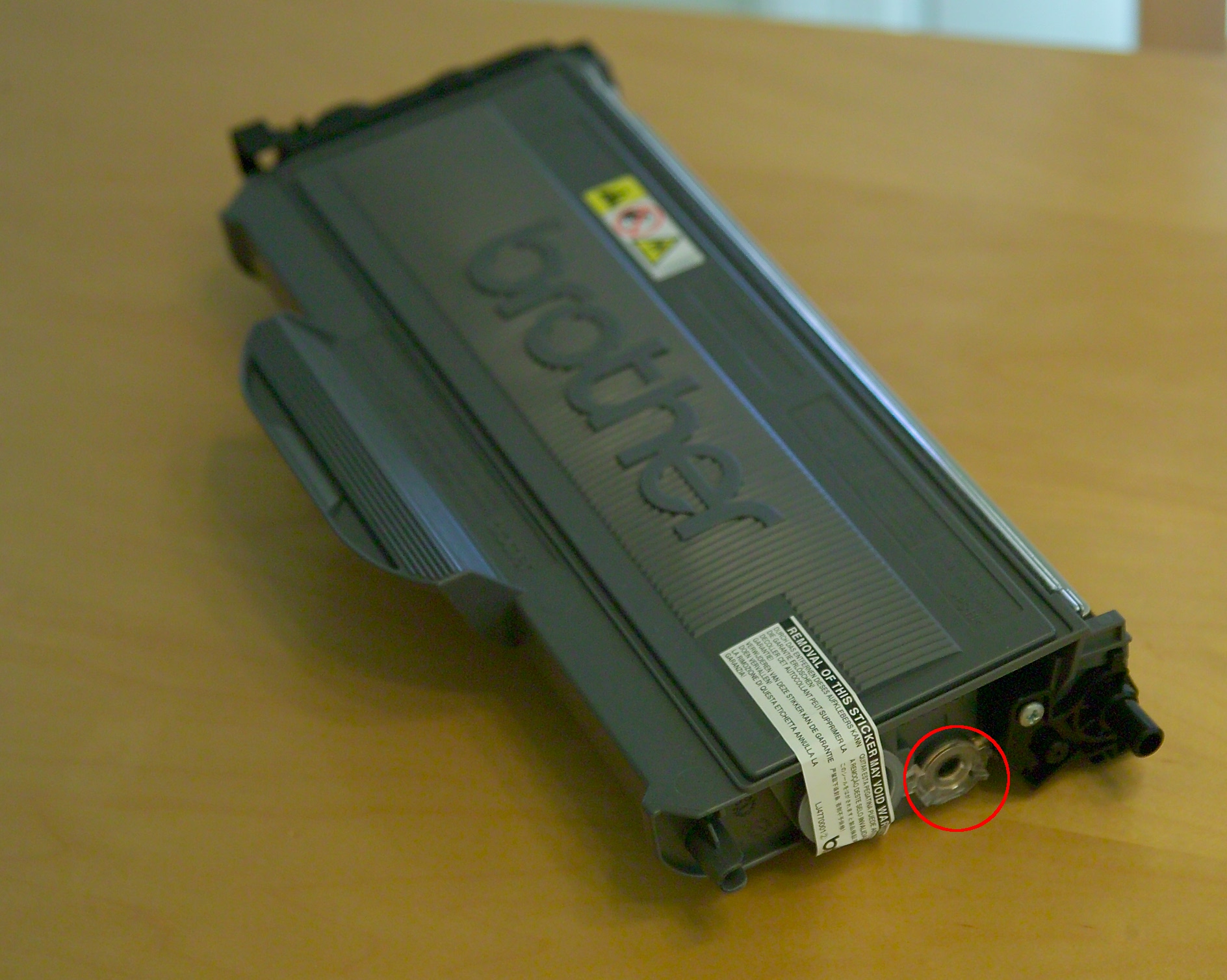
My printer stopped working when the page count is only about 650 pages. To get around this problem, there is a trick that you can do it by yourself. Here are the steps.
- Follow the printer’s instructions to take out the toner.
- There is a round hole to the right side of the toner. Use a strip of non-transparent tape to cover this hole. If you do not have non-transparent tape, you can tape a small piece of paper there instead.

- Insert the toner back to the printer.
thanx for the clue amida. I have a brother inkjet all-in-one that behaves the same, so google resulted in another blog that revealed that the “spine” of the cartidge is actually the window that a light beam shoots thru to indicate the level of ink. Just use a sharpie pen on all three sides and wala – the ink level is always full, until you know it’s time to change when the print quality suffers.
c230,
Thanks for the tip for the brother inkjet all-in-one. Sometimes, the manufacturer goes too far. Fortunately, we have these tips to get around the problems.
Thanks for the tip…works perfectly.
Amazing. Pure genius. Thanks for the tip!
Thansk for the tip, it works perfectly fine
Thank you… saved me some $$$$.
Thank you so much – you’re a genius!!!!!!!!!
Wonderful! Thanks a ton!
Brilliant! Works for the Brother HL-4040 (TN-115 cartridges). You’ve just saved me a TON of money. Thank you!
Thanks. worked and print quality is great. Obviously, lot of toner ink still left in the catridge.
Unfortunately this didn’t work for the newer Brother HL 2240. The toner doesn’t have a sensor located where indicated. Any ideas where they’re hidding it?
Hello,
Please let me know if you ever found out where the sensors on the HL-2240 are located. Thanks!
You wondeful))) it’s work!!!
I have the brother 7860 dw. Ive tried to cover every possible place that could be a sensor. NOTHING helps. Did they change the sensor with this new model?
I always wonder why people want to use laser printer when they could just use the normal one. They are perfectly fine and they seem the same to me. Then when I bought one during a PC fair at a very reasonable price, I am quite happy about it. It’s not only I’ll be able to save on inks and paper since I a regular printer. So far I have no complain until I have to change and install the laser printer cartridges by myself. However, I am happy that I am still able to learn through the internet. I am enjoying the posts on your website. Thanks for posting.
Thank you so much – I was looking everywhere where that sensor would be – it works and I’m sooooo happy!
I faced similar sort of problem with my printer. But I lived with it somehow. Thanks for providing the information.
Worked perfectly, Thanks… I had to print something today and could not wait for the newly bought toner to get shipped and received and exchanged! Perfect workaround!
I had read this someplace else on the web, but was not able to locate where should be covered… THANKS for providing the picture along with explanation!!
Here’s what worked for my Brother MFC7460DN printer. The reset for “Toner Ended” is a little different. The “options” button doesn’t do it. Instead, open the toner door, press “clear” (with the little circular arrow), then press *00. The message “accepted” appears and all is well. Thank you to all who have helped me and my church save money.